
Most professionals spend upwards of eight hours a day tethered to a glowing screen without realizing that their mobile workstation is slowly reshaping their skeletal alignment into a source of permanent agony. The laptop was meticulously designed for portability and convenience, yet it remains fundamentally at odds with the human skeletal system. While the ability to work from a coffee shop or a plane represents a modern luxury, the price of this flexibility is often paid in chronic neck tension and recurring back spasms. Most users fail to recognize that by the time the first sharp twinge of pain manifests, the body has already been struggling to compensate for a poorly positioned screen for months or even years.
The Invisible Toll of the Portable Office
The modern portable office creates a deceptive sense of comfort while exerting a hidden physical strain. Unlike traditional desktop setups where components are separated, the compact nature of a laptop encourages a collapsed posture that deviates from natural ergonomics. This physical toll accumulates silently, as the musculoskeletal system attempts to stabilize a head that is constantly tilted downward. Over time, the subtle shifts in posture lead to a degradation of spinal health that becomes increasingly difficult to reverse without significant intervention.
Prolonged use in non-optimized environments often results in a condition where the muscles of the upper back and neck remain in a state of constant contraction. This persistent state of tension restricts blood flow and leads to the buildup of metabolic waste in the muscle tissue, causing the stiffness many remote workers consider a normal part of the job. However, this discomfort is an early warning system indicating that the structural integrity of the workspace is failing to support the biological needs of the user.
The Design Flaw: Problems Inherent in Portable Computing
Laptops present a unique ergonomic dilemma because the screen and the keyboard are physically tethered together in a single chassis. In a truly healthy workstation, the eyes should look straight ahead at a horizontal plane while the hands and wrists rest comfortably at waist height. Because a laptop forces these two critical points into a narrow proximity, the user is perpetually forced to choose between hunching the shoulders to see the display or straining the wrists to reach the keys. This structural conflict is a primary driver of modern musculoskeletal disorders in the digital workforce.
This inherent compromise means that no single position for a standalone laptop can be considered ergonomically sound for long-term use. If the device sits on a desk, the screen is too low; if the device is raised to eye level, the keyboard becomes a literal hurdle for the arms. This forced trade-off creates a cycle of repetitive stress that impacts the body from the fingertips to the cervical spine, making the “all-in-one” design a significant liability for those who do not utilize external aids.
The Anatomy of the Ergonomic Dilemma
When a laptop sits flat on a desk, the screen remains significantly below the natural eye level of the user. To compensate for this gap, the head tilts forward and downward, placing immense pressure on the cervical spine. This posture, frequently identified as “tech neck,” leads to compressed discs and chronic tension in the trapezius muscles. The weight of the human head, when balanced correctly, is manageable, but even a slight forward tilt drastically increases the mechanical load on the supporting structures of the neck.
Beyond the spine, attempting to fix the neck issue by simply raising the laptop on a stand without adding peripherals creates a secondary crisis for the limbs. If the device is lifted, the user must reach upward to type, creating an unnatural angle at the wrists and elbows. This configuration restricts blood flow and heightens the risk of repetitive strain injuries like carpal tunnel syndrome. Furthermore, an incorrect height impacts visual health, as a poorly tilted screen leads to digital eye strain and frequent headaches when the eyes struggle to maintain focus while the body is under physical stress.
Expert Insights and Clinical Findings
Health professionals at the Mayo Clinic and other leading medical institutions consistently emphasize that the human body functions best when maintained in a “neutral” position. Research into spinal mechanics suggests that for every inch the head leans forward beyond its natural center, it gains roughly ten pounds of effective weight on the delicate neck muscles. This compounding force explains why seemingly minor postural habits result in such profound long-term damage. Experts agree that the only sustainable way to use a portable computer for extended professional work is to decouple the screen from the input device.
Clinical findings suggest that mechanical strain is not merely a matter of muscle soreness but can lead to long-term neurological impacts. Nerve compression resulting from poor thoracic and cervical alignment can cause numbness in the hands and persistent migraines. By prioritizing the vertical alignment of the ears over the shoulders, users can mitigate these risks. The consensus among ergonomic specialists remains clear: the workstation must be adapted to the human form, rather than forcing the human form to adapt to the constraints of the hardware.
Strategies for a Pain-Free Workspace
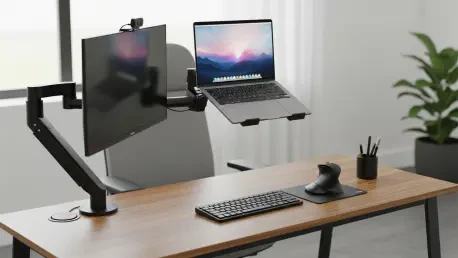
The most effective solution for the modern professional involved raising the laptop screen to eye level using a dedicated stand or a stable platform. Once the display reached the correct height, the connection of an external Bluetooth or USB keyboard and mouse became the essential next step. This configuration allowed the arms to remain at a ninety-degree angle at the sides while the gaze stayed parallel to the floor. The transition toward this modular setup effectively eliminated the structural conflict between the eyes and the hands, providing a foundation for long-term physical health.
For those who worked primarily from a fixed location, the integration of a larger external monitor served as the gold standard for ergonomic protection. In these scenarios, the laptop functioned as the central processor while the user interacted with a display set at the precise height and distance required for optimal eye health. Hardware choices also evolved, with many professionals selecting devices with detachable keyboards to facilitate immediate separation. Ultimately, the successful optimization of the workspace required a proactive approach to equipment, ensuring that the convenience of portable computing did not come at the expense of the user’s physical longevity.