
The digital workspace has reached a tipping point where the invisible threads of wireless connectivity often fail to support the heavy weight of our professional and creative demands. While the convenience of mobility has defined the last decade of computing, the sudden drop in a high-stakes video conference or the sluggish lag during a large file transfer serves as a harsh reminder that airwaves have their limits. A new standard in desktop hardware is emerging to tackle this instability by embedding a traditional RJ45 Ethernet port directly into high-resolution monitors. This integration effectively transforms the display into a centralized network hub, offering a permanent and robust solution to the unpredictable nature of modern wireless environments.
The End of the Wi-Fi Gamble in Modern Workspaces
Wireless networking has long been marketed as the ultimate freedom, yet many users find themselves tethered to the closest router in a desperate search for a reliable signal. In modern high-density environments, the “spinning wheel” of buffering is often viewed as an unavoidable nuisance of the wire-free desk. However, hardware manufacturers are now bridging this gap by moving the networking core into the display. By positioning the Ethernet port on the back of the monitor, they provide a stationary anchor that ensures a consistent data flow, effectively ending the gamble of relying on shared airwaves for critical tasks.
This shift toward integrated networking addresses the psychological toll of connectivity anxiety. When a user knows their connection is physically locked into the infrastructure of the building, they can focus entirely on their output rather than troubleshooting signal strength. This evolution signals a move away from the minimalist compromise of “wireless-only” setups toward a more functional reality. The monitor is no longer just a window into the digital world; it has become the gateway through which all data must travel to ensure peak performance.
Bridging the Gap in the Thin-and-Light Laptop Era
The trajectory of laptop design has favored ultra-slim profiles and extreme portability, which has come at the direct expense of physical port variety. For users of modern ultra-light notebooks, the disappearance of the dedicated LAN port created a hardware deficit that previously required a clunky array of dongles and external adapters. Ethernet monitors solve this structural problem by serving as a fixed docking station. This design allows users to enjoy the aesthetic benefits of a thin laptop while maintaining access to the high-speed wired infrastructure that is physically impossible to fit inside a contemporary mobile chassis.
By relocating the heavy lifting of networking to the monitor, the workspace remains flexible and uncluttered. A professional can carry a sleek device through the day and, upon returning to their desk, instantly gain the connectivity of a workstation. This symbiotic relationship between the portable device and the static monitor eliminates the need to carry a bag full of plastic hubs. It represents a mature approach to hardware, where each component of the desk setup performs the task it is best suited for without forcing the user to sacrifice speed for style.
The Technical Advantage of Integrated Wired Networking
In environments where dozens of routers compete for the same frequency, signal interference and packet loss are almost guaranteed. An Ethernet-equipped monitor creates a shielded, dedicated pathway for data that remains unaffected by the electronic noise of household appliances or neighboring networks. This physical isolation provides a level of stability that software-based Wi-Fi optimizations simply cannot match. For those working in crowded urban centers or corporate hubs, this direct line is the difference between a fluid workflow and constant interruption.
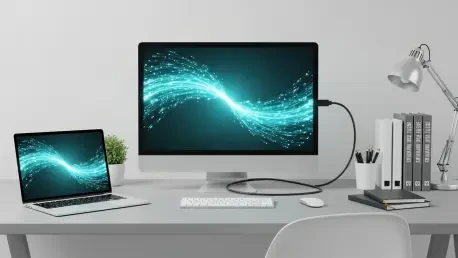
Beyond stability, the reduction in latency is the primary driver for those handling data-heavy tasks. Whether it involves editing cloud-based video assets or participating in competitive gaming, the milliseconds saved by a wired connection are tangible. Data travels through the monitor with a consistent ping, ensuring that there are no unexpected spikes in response time. Furthermore, modern monitors often utilize a single-cable integration, where networking, power, and video all flow through a single USB-C or Thunderbolt connection, optimizing the internal bandwidth of the workspace.
Expert Perspectives on the Ergonomics of Connectivity
Hardware analysts have observed that the modern monitor is evolving into a “holistic peripheral,” acting as the brain of the desk rather than a passive screen. Ergonomic experts suggest that the reduction of “cable chaos” has a direct impact on productivity by lowering the cognitive load of a cluttered environment. By consolidating the stiff, unsightly Ethernet cable behind the monitor, the user maintains a clean visual field. This design philosophy recognizes that a simplified physical space often leads to a more organized mental state, allowing for deeper concentration during complex projects.
Reports from remote workers highlight that the transition between mobile and desktop modes is the most significant point of friction in a hybrid schedule. Monitors with integrated networking eliminate this friction by providing a “one-click” experience. When the Ethernet cable is permanently housed in the display, the act of connecting a laptop becomes a seamless ritual. This integration encourages a more disciplined use of the workstation, as the technical barriers to high-performance computing are removed, leaving only a clean, efficient surface for the user to engage with.
Strategies for Optimizing Your Ethernet Monitor Setup
To fully realize the benefits of this technology, it is essential to ensure that the hardware chain is properly configured. Users should verify that their laptop supports Power Delivery and DisplayPort Alt Mode through its USB-C port, which allows the single connection to charge the device while delivering internet and video. Using a high-quality Cat6 or Cat6a cable to connect the router to the monitor’s LAN port ensures that the bandwidth is not throttled by outdated wiring. This setup provides the foundation for a professional-grade environment that can handle the most demanding digital tasks.
Once the physical connections are established, optimizing the software settings was the final step for a superior experience. Disabling the Wi-Fi on the operating system forced the device to prioritize the wired connection, which immediately stabilized throughput for large-scale transfers and high-definition streaming. Many also took advantage of the additional USB ports on these monitors to connect peripherals like mice and external drives. By treating the monitor as the central terminal for all wired connections, users moved toward a future where the desk remained a sanctuary of focus, free from the tangle of wires that once defined the high-performance workspace.