
The persistent challenge of modern productivity is not a lack of powerful tools but the friction involved in using them, a reality nowhere more apparent than in the meticulous, often tedious, process of managing a digital calendar. Despite the ubiquity of sophisticated platforms from tech giants, the simple act of adding a new event often involves a cumbersome dance of navigating menus, filling out specific fields, and ensuring every detail is correctly logged. This disconnect between human thought and digital input creates a barrier, turning a tool designed for organization into a source of minor but constant frustration. The search for a more seamless solution—one that could interpret unstructured, conversational language to manage schedules with minimal effort—has led to the development of specialized AI utilities. One such application, Toki, exemplifies this new approach, focusing not on replacing comprehensive calendar systems but on perfecting the single most crucial interaction: getting appointments onto the schedule effortlessly. By serving as an intelligent and intuitive add-on, it addresses a fundamental flaw in digital scheduling, transforming it from a chore into a simple conversation.
The Quest for a Frictionless Interface
For years, the standard for digital scheduling has been dominated by robust but clunky applications like Google Calendar, which feel functionally archaic when it comes to the simple task of event creation. The quest for a superior user experience led many to explore premium alternatives such as Fantastical. While its sleek design and early implementation of natural language processing were commendable, its platform limitations, particularly its absence on Android, rendered it an incomplete solution for a significant portion of users. Moreover, even these advanced tools often required a degree of structured input that fell short of true, effortless interaction. The persistent issue remained: the market was saturated with powerful back-end systems but lacked a truly universal and intuitive front-end that could interpret human language naturally. This gap highlighted a clear need for a tool that could serve as a simple, intelligent layer atop existing calendar infrastructures, making the act of scheduling as fluid and straightforward as sending a text message to a personal assistant.
This specific market niche is where the AI utility Toki has carved out its purpose, representing a thoughtful evolution of a concept first introduced two years ago as a service named Dola. Initially, Dola operated as a chat-based AI assistant integrated directly into popular messaging platforms like WhatsApp, Telegram, and iMessage. Users could simply add it as a contact and send commands to create calendar events. While this approach was innovative and functional, its reliance on third-party messaging apps created a fragmented user experience and limited its integration into a unified personal workflow. Recognizing these constraints, the developers strategically pivoted, rebranding and rebuilding the service into the dedicated Toki application. This transformation into a standalone app available across iOS, Android, and the web was a critical move, expanding its accessibility and turning a clever gimmick into an indispensable, cross-platform utility that seamlessly enhances the calendars users already rely on.
Streamlining Scheduling with Conversational AI
The primary strength of Toki lies in its elegant simplicity and the power of its core function: making the creation of new appointments as painless as possible. The setup process is streamlined to minimize friction, allowing users to sign up quickly and sync their primary calendars from a variety of major providers, including Google, Apple, and Outlook. The free version accommodates one synced account, a provision that proves more than sufficient for the majority of individual users. Once configured, the interaction model is brilliantly intuitive. Users open the app and simply type or speak a command in plain, conversational language. The need to navigate complex menus or fill out structured forms is completely eliminated. Whether the command is a simple “dentist appointment next Thursday at 3 pm” or a more detailed “follow up with Sarah about the project proposal next Tuesday at 10 am at the coffee shop on Main Street,” the application’s natural language processing engine instantly parses the essential information and creates the event correctly without any further intervention.
Further enhancing its accessibility, Toki’s voice input feature demonstrates a remarkable level of accuracy and sophistication, solidifying its role as a hands-free organizational assistant. The system is adept at interpreting even disorganized or rambling spoken commands, successfully identifying the key details of date, time, and location to create a perfectly formatted calendar entry. This capability is particularly valuable for users on the go, allowing them to capture appointments and reminders without having to stop and type. The flawless synchronization with the user’s primary calendar ensures reliability and maintains a single source of truth for their schedule. By mastering both text and voice inputs, the application effectively removes the final barriers between a fleeting thought and a scheduled commitment, making the process of calendar management feel less like a data-entry task and more like a natural conversation with a highly efficient assistant who never misses a detail.
Intelligent Features Beyond Basic Event Creation
Beyond its exceptional natural language processing, Toki distinguishes itself with several unique and value-added features that elevate its utility from a simple shortcut to a comprehensive planning assistant. A standout function is the “Call me” option, which can be enabled for any event or reminder. Instead of relying on a standard push notification, which can be easily missed or dismissed amidst a sea of other alerts, this feature triggers a direct phone call to the user at the designated time. This proves to be an incredibly effective tool for critical appointments, as a ringing phone demands immediate attention in a way that a silent, on-screen notification cannot. This single feature transforms the application from a mere convenience into a robust reliability tool, providing a powerful safeguard against overlooking important commitments and ensuring that the most crucial reminders are always heard.
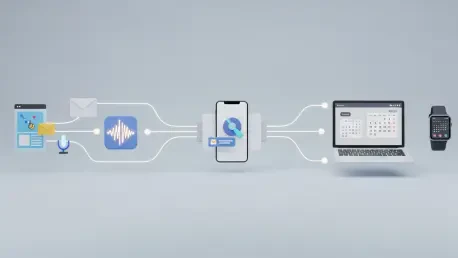
The application’s intelligence extends to other thoughtful functionalities designed to integrate seamlessly into a user’s daily digital life. It possesses the ability to create calendar events directly from screenshots, intelligently parsing text and date information from an image to schedule an appointment. Furthermore, it can integrate with messaging apps like WhatsApp to automatically detect and add scheduled events that are discussed within chat conversations, capturing plans as they are made. Users can also forward emails containing event details directly to the service for automatic scheduling. Complementing these features are “smart insights,” which provide users with daily weather forecasts and a weekly schedule recap. These additions, while small, enhance its role as a proactive planning partner. This suite of intelligent features demonstrates a deep understanding of user needs, making Toki not just a tool for adding events, but a holistic assistant for managing them.
A Focused and Effective Business Model
The strategic approach taken with Toki’s business model played a significant role in its adoption. It was not positioned as a direct competitor to the comprehensive, feature-rich platforms of Google Calendar or Outlook. Instead, it was introduced as a specialized, supplementary tool that excelled at one specific, crucial task: getting appointments, events, and reminders into a calendar with maximum speed and minimal effort. The free plan was generously structured for casual users, offering up to 14 event additions per week and support for syncing two calendars, a limit that proved ample for regular personal use. For power users or professionals with more demanding scheduling needs, a Pro plan was made available for a reasonable subscription fee, removing all usage restrictions. This freemium model effectively catered to a wide spectrum of users, allowing everyone to experience the core value proposition without an initial financial commitment. By focusing on perfecting a single pain point rather than attempting to replicate every feature of its larger counterparts, the application successfully carved out its niche and demonstrated its immense value.