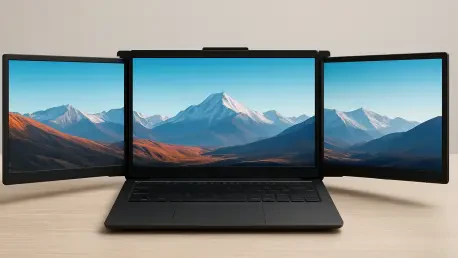

The demand for high-performance mobile workstations has never been higher, as professionals increasingly reject the confines of a traditional office in favor of dynamic environments that require both power and portability. The 1920 by 1200 resolution of these panels is specifically tailored to meet the demands of professional tasks such as coding and document editing. This specific resolution provides a clear advantage over standard high-definition screens by offering additional vertical space, which is essential for viewing long lines of code or complex legal documents without constant scrolling. By integrating such precise specifications into a portable format, the hardware addresses the primary frustration of modern remote workers who often feel limited by the constraints of a single laptop screen. Rather than relying on bulky external monitors that tether a person to a single desk, this system utilizes a modular approach that allows for a customized workspace that fits in a backpack.
The Mechanics of Modular Innovation
Connectivity: Bridging the Digital Gap
The core of this hardware solution lies in its radical departure from traditional monitor connectivity, which usually necessitates a chaotic arrangement of HDMI, DisplayPort, and USB-C cables to function correctly. By utilizing proprietary magnetic contact strips positioned along the edges of each 16-inch panel, the system enables a daisy-chain effect that allows power and data to flow seamlessly from the primary laptop connection through to every subsequent screen. This innovation effectively eliminates the “cable nest” problem that often discourages users from setting up multi-monitor arrays in temporary locations like coffee shops or airport lounges. The magnets are strong enough to ensure a stable connection while allowing for rapid assembly, meaning a full triple-screen workstation can be deployed in approximately sixty seconds. This focus on streamlining the setup process reflects a deep understanding of the friction points in mobile computing, where time spent managing hardware detracts from actual productive output.
Structural Integrity: Materials and Design
Structural integrity is maintained through the strategic use of a magnesium-aluminum alloy, a material choice that balances the conflicting requirements of extreme durability and lightweight portability. Weighing in at roughly 6.6 pounds for the entire kit, the system is light enough to be carried throughout the day without causing significant physical strain, yet the alloy construction ensures that the panels can withstand the rigors of frequent travel and repetitive mounting. The central stand is not merely a support structure; it is an ergonomic tool designed to raise the primary laptop screen to eye level, thereby reducing the chronic neck and back pain often associated with long-term laptop use. This elevation allows the auxiliary screens to align perfectly with the user’s line of sight, creating a cohesive visual field that spans up to four displays, including the laptop itself. By prioritizing the structural engineering of the stand, the design ensures that the setup remains stable even when all three additional screens are attached.
Flexibility for Dynamic Workflows
Orientation: Versatile Task Management
A significant advantage of the modular design is the unprecedented level of customization it offers for different professional workflows, allowing users to move beyond the limitations of standard landscape-only displays. Each panel can be rotated up to 270 degrees, providing the ability to switch between wide panoramic views and tall vertical orientations depending on the specific requirements of the project. For software developers, a vertical orientation is often preferred to view more lines of code simultaneously, while financial analysts might choose a traditional landscape setup to manage massive spreadsheets with dozens of columns. This level of adaptability ensures that the hardware remains useful across a diverse range of industries, from creative writing and legal research to data science and stock trading. Because the magnetic connections function regardless of the screen’s orientation, the transition between these modes is as simple as detaching a panel and snapping it back into place in the desired position to meet task demands.
Spatial Optimization: Vertical Stacking
Innovation extends further with the inclusion of a specialized top slot on the main stand, which enables a vertical stacking configuration that is rarely seen in portable monitor solutions. This allows one of the 16-inch screens to be positioned directly above the laptop’s primary display, creating a tiered visual arrangement that maximizes screen real estate without expanding the horizontal footprint of the desk. Such a configuration is particularly effective for managing communication platforms or monitoring live data feeds while the main screens are dedicated to primary work tasks. Beyond personal productivity, the system also facilitates better collaboration through a dedicated presentation mode where the screens can be turned outward to face an audience or a colleague sitting across the table. This turns a standard one-on-one meeting into an interactive session where information can be shared visually without a projector. Furthermore, the modular nature of the system means that a user can choose to carry only a single screen for short trips.
Market Positioning and Real-World Use
Performance: Professional Productivity Focus
In terms of raw performance, the hardware is clearly engineered to excel in professional environments where clarity and reliability are prioritized over the high refresh rates required for competitive gaming. Each 16-inch panel delivers a sharp 1920 by 1200 resolution at a steady 60Hz, ensuring that text remains crisp and video playback is smooth during virtual conferences or instructional sessions. This focus on “productivity first” specs allows for more efficient power management, which is a critical consideration for users who may be working away from a direct power source for extended periods. The use of high-quality IPS panels ensures that color reproduction is accurate and viewing angles are wide, preventing the image distortion that often plagues cheaper portable screens when viewed from the side. While creative professionals working in high-end color grading might require more specialized equipment, the vast majority of business users and developers will find these specifications more than adequate for their daily needs across software apps.
Reliability: Long-Term Market Value
Looking toward the practicalities of acquisition and long-term ownership, the manufacturer behind this system brings nearly a decade of experience in the laptop accessory market, having established a solid reputation for reliable docking stations and connectivity hubs. This history of production consistency is a vital factor for early adopters, as it reduces the risks typically associated with innovative hardware projects in their initial release phases. While the current production timeline points toward a delivery window in early 2027, the initial response from the professional community suggests that the demand for such a modular solution far outweighs the inconvenience of a waiting period. The projected retail pricing reflects the premium nature of the materials and the proprietary technology involved; yet, for those who rely on multi-monitor setups to maintain their livelihood while traveling, the investment represents a significant upgrade in capability. As professional work continues to decouple from the office, tools that provide efficiency are essential.
Advancing the Standard for Portable Productivity
The emergence of modular, magnetic display technology marked a turning point in how professionals interacted with their digital environments, moving beyond the static limitations of the past. It was recognized that the ability to deploy a four-screen workstation in any location fundamentally changed the speed and quality of work produced by remote teams. Moving forward, the focus shifted toward optimizing internal battery life within these panels to further reduce the reliance on the primary laptop’s power reserves. Organizations looking to support a hybrid workforce considered the ergonomic and productivity benefits of providing such adaptable hardware to their employees. Future developments likely explored the integration of touch-sensitive surfaces and higher color accuracy to cater to the growing demographic of mobile creative professionals. The transition to modular hardware was not merely about adding more screens, but about redefining the portability of the professional workspace for users worldwide.