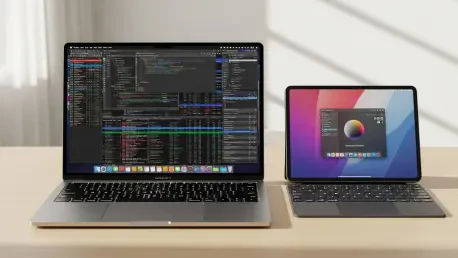

The long-standing assumption that the entry-level iPad represents the most cost-effective gateway into the Apple ecosystem is currently being dismantled by the debut of the MacBook Neo, a device that redefines the budget computing segment for 2026. For years, the base-model iPad stood alone as the undisputed champion for students and casual users, offering a low barrier to entry for those seeking the reliability of Apple software. However, the introduction of the Neo has fundamentally shifted the value proposition by addressing the inherent limitations of a tablet-first workflow. While the iPad 11 remains a marvel of engineering, the MacBook Neo is purpose-built to fill the void for users who require a traditional, robust computing experience without the prohibitive price tag of higher-end laptops. This shift forces a necessary reevaluation of what consumers should prioritize when selecting a primary device for productivity, as the gap between mobile versatility and desktop utility has narrowed in some areas while widening in others.
The Financial Reality of Productivity
Pricing and Hardware Efficiency: The Real Cost of Ownership
While the iPad 11 carries an attractive initial price of $349, this figure rarely reflects the true cost of a functional setup for anyone intending to use the device for significant work or academic tasks. To transform the tablet into a viable laptop alternative, users almost invariably find themselves purchasing the Magic Keyboard Folio, a necessity that immediately inflates the total investment to approximately $600. In stark contrast, the MacBook Neo enters the market at that exact same $600 price point, yet it arrives as a complete, integrated package featuring a permanent keyboard and a significantly larger trackpad. By including these essential productivity tools as standard hardware, the Neo effectively neutralizes the iPad’s perceived affordability. When consumers calculate the bottom line for a device that can actually handle multi-hour typing sessions or complex navigation, the MacBook Neo emerges as the more honest and economical choice for the modern budget-conscious buyer.
Beyond the immediate financial layout, the hardware efficiency of the MacBook Neo provides a level of sustained performance that the iPad 11 simply cannot match in high-demand scenarios. The Neo is powered by the A18 Pro chip, a significant leap forward from the A16 processor housed within the base iPad, ensuring that the laptop handles intensive background processes without the thermal throttling often seen in fanless tablets. This processing advantage is paired with a baseline of 8 GB of RAM, which is the critical threshold required to run the full suite of Apple Intelligence features and advanced AI-driven multitasking tools. The iPad 11, restricted to 6 GB of RAM, faces an immediate technical ceiling that limits its lifespan and compatibility with upcoming software innovations. Consequently, the MacBook Neo does not just offer better value at the point of sale; it provides a more durable and future-proof platform that protects the user’s investment against the rapid evolution of system requirements.
Hardware Comparison: Longevity and Feature Support
The disparity in storage capacity further illustrates the value gap between these two entry-level machines, especially for users who manage large media libraries or complex project files. The MacBook Neo starts with a generous 256 GB of internal storage, providing ample room for applications and documents without forcing the user into a monthly cloud subscription or constant file management. The iPad 11, however, begins with a restrictive 128 GB, which can quickly become a bottleneck as high-resolution video and modern application sizes continue to grow. This difference means that the MacBook Neo user can operate with a level of independence and local data security that the iPad user must pay extra to achieve through upgrades. Choosing the Neo means opting for a device that respects the user’s need for local space, reinforcing its position as a serious tool for creators and professionals who cannot always rely on high-speed internet connectivity.
Furthermore, the physical dimensions of the MacBook Neo provide a more immersive and productive environment than the more compact iPad 11. The 13-inch display on the Neo offers substantially more digital real estate, allowing for side-by-side window management that feels cramped on the 11-inch tablet screen. This extra space is not merely a luxury; it is a functional requirement for anyone juggling multiple browser tabs, spreadsheets, or coding environments simultaneously. While the iPad remains the superior choice for handheld consumption or specialized tasks like digital illustration with an Apple Pencil, it struggles to compete with the MacBook Neo when it comes to standard office or educational workflows. The laptop form factor is optimized for the way people actually sit and work for eight hours a day, providing an ergonomic advantage that no magnetic keyboard accessory can fully replicate, making the Neo the clear winner for long-term comfort.
Evaluating System Versatility and Workflow
Operating Systems: Desktop Precision vs. Mobile Limitations
The most profound distinction between these devices is found in the software architecture, where macOS provides a level of professional utility that iPadOS has yet to achieve. On the MacBook Neo, users benefit from a traditional and unrestricted file system, allowing for the easy organization of project folders, the running of scripts, and the management of external drives without the friction of app sandboxing. This transparency is vital for complex workflows where data must move seamlessly between different professional applications. While Apple has made strides in making the iPad more “Mac-like,” the underlying mobile-first logic of its operating system often results in a “friction-heavy” experience for power users. The MacBook Neo removes these barriers, offering a mature environment where the software adapts to the user’s needs rather than forcing the user to find workarounds for mobile-centric limitations.
Multitasking capabilities further highlight the superiority of the desktop environment for those who need to maintain a high level of efficiency. The MacBook Neo allows for true windowing, where users can overlap, resize, and layer dozens of applications, a stark contrast to the more rigid Stage Manager interface found on the iPad. This flexibility is supported by the ability to run desktop-class browsers like Chrome or Firefox with full extension support, ensuring that web-based enterprise tools and academic portals function exactly as intended. On the iPad, browsers are frequently hampered by mobile engines that can break certain site features or prevent advanced file uploads. For any user whose daily life revolves around the modern web, the MacBook Neo provides a reliable and uncompromised window into the digital world, ensuring that they never encounter the “not supported on mobile” errors that still plague the tablet experience.
Connectivity and Ergonomics: Professional Standards and Interface
Physical connectivity serves as another area where the MacBook Neo outclasses the iPad 11, particularly for users who integrate their devices into a larger ecosystem. The Neo features two USB-C ports, with one supporting high-speed USB 3 data transfer, enabling a streamlined workflow where the user can charge their machine while simultaneously connected to a high-resolution external display or a fast SSD. The iPad 11 remains tethered to a single USB 2 port, which not only limits data transfer speeds to archaic levels but also necessitates the purchase of an expensive hub for even the most basic multi-peripheral setups. This lack of ports on the iPad reflects its heritage as a consumption device, whereas the dual-port configuration of the Neo signals its status as a legitimate workstation. For those who value a clean setup and fast data migration, the MacBook Neo’s interface is undeniably superior.
The tactile experience of the MacBook Neo further cements its status as the premier productivity tool in the budget category. Its full-sized, scissor-switch keyboard is built directly into the chassis, providing a stable and comfortable platform for heavy typing that far exceeds the experience of using a detachable folio. Users who spend their days writing reports, coding, or managing high-volume email correspondence will find the Neo’s keyboard to be more responsive and less fatiguing than the cramped layout of the iPad’s keyboard accessories. The integrated trackpad is also significantly larger and more precise, supporting the full range of macOS gestures that make navigating a complex desktop environment feel intuitive. While the iPad 11 will always be the champion for artists who require the precision of a touch-sensitive stylus, the MacBook Neo was engineered for the vast majority of users who prioritize the keyboard and mouse as their primary inputs.
The comparison between these two devices revealed a significant shift in the value hierarchy of entry-level computing. While the iPad 11 maintained its niche for creators who specifically required the Apple Pencil and a highly portable touchscreen, the MacBook Neo proved to be the more rational choice for standard productivity. By offering a comprehensive desktop operating system, superior internal specifications, and integrated hardware at a price point that matched a fully equipped iPad, the Neo redefined expectations for the budget market. Users who transitioned to the MacBook platform gained a level of versatility and long-term utility that the tablet’s mobile-first architecture could not provide. Moving forward, the most effective strategy for students and professionals was to assess their primary input needs; unless digital illustration was the core requirement, the MacBook Neo represented the smarter investment for a sustainable and efficient workflow.