
Nia Christair is a leading voice in mobile technology and hardware design, bringing years of expertise in mobile gaming, app development, and enterprise-level hardware solutions. With a career spanning the evolution of portable computing, she has a unique perspective on how legacy hardware interacts with modern workflow demands. In this discussion, we explore the niche market of laptops that still feature internal optical drives, the logistical challenges of maintaining aging hardware, and the balance between durability and portability in professional environments.
Modern slim laptops often sacrifice optical drives for portability. How do you evaluate the performance trade-offs and thermal management challenges when using a bulkier workstation like the HP ZBook 17 G5 for intensive video editing or engineering simulations today?
The HP ZBook 17 G5 is a fascinating study in hardware longevity because it was built as a workstation first, which inherently changes how it handles heat compared to a modern ultrabook. Because it is designed to accommodate a Blu-ray optical drive and a complex cooling system, the chassis is significantly thicker, allowing for better airflow when the Intel Xeon E-2186M processor is under a heavy load. Even though this hardware dates back to 2018, it still holds its own in engineering simulations because workstations are over-engineered to prevent thermal throttling during 24-hour render cycles. You aren’t going to get the efficiency of a brand-new chip, and you might see price tags ranging from $1,700 to over $5,000 depending on the configuration, but the trade-off is a machine that doesn’t scream under the pressure of a heavy video edit. It feels like a tank because it was built to be one, providing a level of sustained performance that slim laptops simply cannot match without aggressive software downclocking.
Finding specific models like the Dell Inspiron 5570 or Lenovo ThinkPad E570 requires scouring secondary markets. What steps should a buyer take to verify the exact internal hardware specs, and how do you mitigate the risks of buying refurbished electronics from third-party sellers?
When you are hunting for these specific legacy models, you have to be incredibly diligent because manufacturers often used the same chassis for different configurations. For the Dell Inspiron 15 5000 series, for instance, you have to check the physical thickness; the 22.70mm variant usually houses the optical drive, while the slimmer 19.90mm version does not. I always advise buyers to request the specific service tag or serial number so they can look up the original spec sheet to confirm if it has the i5-8250U or perhaps the AMD-based 5575 internals. Since you can no longer buy these directly from Lenovo or Dell, you are at the mercy of third-party sellers on sites like eBay or Amazon, so you must prioritize sellers with high ratings and clear return policies. Buying refurbished is always a gamble, but verifying the exact model number—like ensuring a ThinkPad is the E570 and not a newer drive-less version—is the only way to guarantee you get that SuperMulti DVD Burner you’re looking for.
Rugged devices like the ToughBook 56 offer modular expansion slots for drives, while the Fujitsu A3511 remains a regional specialty. How does this modularity impact long-term durability, and what are the logistical hurdles involved when importing specialized hardware from international markets like Japan?
Modularity is a double-edged sword for durability, but Panasonic handles it brilliantly by using “exclusive options” where the DVD Multi Drive is an accessory rather than a fixed point of failure. This design allows the ToughBook 56 to maintain its shock-resistant and impact-protected status while giving the user the flexibility to swap components as needs change. On the other hand, a device like the Fujitsu Lifebook A3511 is a “late bloomer” from 2021-2022 that offers a more traditional built-in drive, but it is largely restricted to the Japanese market. Importing such a device involves navigating high shipping costs and potential customs fees, which can turn a budget-friendly laptop into a much more expensive investment. You also have to consider the emotional tax of waiting for international shipping and the technical hurdle of potentially dealing with regional software configurations or keyboard layouts.
Many laptops with built-in drives rely on 8th or 11th Gen Intel processors. For users prioritizing productivity over gaming, what are the practical limitations of these older CPUs, and what specific software optimizations can help maintain a smooth workflow on this aging architecture?
The limitations are most apparent when you move beyond basic office tasks and into modern multi-threaded applications. An 11th Gen chip like the i5-1135G7 found in the Fujitsu Lifebook is limited to just four cores, which can feel sluggish if you are trying to run a dozen background processes alongside a heavy browser. To keep these machines running smoothly, I recommend aggressive RAM upgrades and switching to lightweight alternatives for resource-heavy apps. These processors are perfectly dependable for browsing and document editing, but they aren’t meant for modern AAA gaming or high-end AutoCAD work. If you stay within the bounds of a productivity-focused workflow and keep your expectations in check, the 8th Gen chips in the Dell 5570 can still feel quite snappy for everyday use.
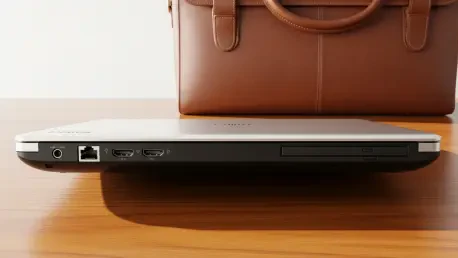
A thicker chassis, such as those on the Lifebook series, provides room for full-sized LAN and HDMI ports alongside the disc drive. How does this footprint affect mobile ergonomics, and why might a professional prefer these legacy interfaces over modern USB-C dongle solutions?
There is a tactile reliability to the Fujitsu Lifebook A3511 that you just don’t get with modern “dongle-life” setups. When you have a bulky design that accommodates a full-sized LAN port and HDMI, you eliminate the mechanical stress and connection drops that often plague USB-C hubs. For a business professional in a high-stakes environment, the sensory “click” of a physical Ethernet cable is worth the extra weight in their bag. Mobile ergonomics do take a hit—you’re carrying a heavier, thicker machine that won’t disappear into a slim briefcase—but the trade-off is a self-contained workstation. You don’t have to worry about forgetting an adapter or having a flimsy dongle snap off in the middle of a presentation, which is a major win for field-based professionals.
What is your forecast for laptops with internal optical drives?
I believe internal optical drives will eventually vanish from the consumer mass market entirely, but they will survive indefinitely in “hardened” and specialized industrial niches. We are moving toward a future where a built-in disc drive is treated as a specialized tool, much like a serial port or a proprietary sensor, rather than a standard feature. While top-tier brands like HP and Dell have already phased them out of their flagship lines, rugged and regional models will likely continue to offer them for another few years to serve the military, medical, and archival sectors. Eventually, the cost of allocating internal chassis space will outweigh the dwindling demand, and even the “late bloomers” will transition to external peripherals as the standard. For the enthusiast who loves physical media, the next five years represent the final window to buy this integrated technology before it becomes a purely vintage pursuit.