
The transition of high-definition gaming from stationary living room consoles to the palm of a hand represents one of the most significant technical achievements in the current landscape of 2026 mobile computing. As smartphone processors now possess the raw computational power to rival legacy dedicated hardware, the ability to run complex seventh-generation console titles has moved from experimental hobbyist circles into the mainstream spotlight for tech enthusiasts. This evolution is not merely about nostalgia; it is a testament to the efficiency of modern ARM-based architectures and the sophisticated software layers that allow disparate systems to communicate. For many users, the primary challenge is no longer whether a mobile device can handle these titles, but rather how to optimize the software environment to ensure a stable and immersive experience. Navigating the world of mobile emulation requires a blend of technical curiosity and a basic understanding of how modern mobile operating systems manage intensive resource allocation during high-fidelity tasks.
1. Defining the Role of Emulation in Mobile Architecture
An Xbox 360 emulator serves as a sophisticated translation layer that allows mobile operating systems to interpret and execute code originally written for the PowerPC architecture of the Microsoft console. Because modern smartphones utilize ARM-based processors, they cannot natively read the instructions found on an Xbox 360 game disc or digital file without an intermediary. The emulator effectively creates a “sandbox” or a virtualized environment that mimics the specific hardware components of the original machine, including its unique triple-core CPU and custom graphics processor. This process is inherently resource-intensive, as the mobile device must not only run the game itself but also dedicate a significant portion of its processing power to maintaining this virtual environment. Consequently, the quality of the experience is deeply tied to the efficiency of the emulator’s code and its ability to bridge the gap between two very different generations of computing technology.
While the concept of emulation is straightforward, the actual performance on a mobile device fluctuates based on several variables, ranging from thermal throttling to the specific graphics API being used by the application. In 2026, the maturity of these software tools has reached a point where many popular titles can maintain consistent frame rates, yet the complexity of the original Xbox 360 hardware means that perfect accuracy remains a moving target. Some games utilize specific hardware quirks of the original console that are difficult to replicate, leading to visual artifacts or audio desynchronization if the emulator is not properly configured. Developers in this space are constantly pushing updates to improve the “translation” speed, ensuring that the heavy lifting done by the phone’s GPU results in smooth visuals rather than stuttering frames. Users must recognize that an emulator is a living project, frequently evolving to better harness the capabilities of the latest flagship mobile chipsets.
2. The Internal Mechanics of Virtual Hardware Simulation
The process of bringing a console game to life on a mobile screen involves several layers of real-time data processing that must occur simultaneously without perceptible delay. When a user initiates a game, the emulator begins by loading a digital image of the game, typically referred to as an ISO file, into the mobile device’s high-speed memory. From this point, the software must perform “binary translation,” which is the act of taking the original game instructions and rewriting them into a format that the mobile CPU can execute. This is a continuous cycle that happens thousands of times per second, requiring a high degree of synchronization between the simulated CPU and the physical hardware. If the translation layer falls behind, the game appears to slow down, a phenomenon often mistaken for network lag but which is actually a localized computational bottleneck within the device itself.
Beyond the core processing of logic and physics, the emulator must also tackle the challenge of graphics rendering, which involves translating the Xbox 360’s specialized shaders into modern mobile graphics languages like Vulkan or Metal. This is often the most demanding part of the emulation chain, as the original console relied on a unified memory architecture that worked differently than the split memory systems found in many older mobile devices. However, with the unified memory designs prevalent in 2026 flagship smartphones, this specific hurdle has become easier to clear, allowing for higher resolution scaling that can actually make legacy games look better on a mobile screen than they did on original hardware. Furthermore, the software must simulate the console’s input/output systems, managing everything from virtual storage access to the mapping of touch-screen gestures onto the buttons of a traditional controller.
3. Implementation Steps for a Successful Mobile Setup
Setting up a mobile device to handle Xbox 360 titles begins with the selection and installation of a reputable emulation application from a verified source. Currently, applications like Xenia and specialized forks of CXBX have seen significant mobile-centric improvements, though they often require manual installation via side-loading or specialized developer repositories due to their experimental nature. Once the software is installed, the user must ensure that the application has the necessary permissions to access the device’s file system, which is critical for reading game data and saving progress. It is advisable to research the specific compatibility list for each emulator, as some applications are optimized for specific types of processors, such as those found in high-end Snapdragon or Dimensity chipsets, while others might struggle with certain GPU architectures.
After the software is prepared, the next phase involves acquiring and transferring the game files, which must be in a compatible digital format like ISO or XEX. To maintain legal and ethical standards, these files should be created by the user from their own physical collection of game discs using a computer with a compatible optical drive. Once the files are transferred to the mobile device’s internal storage, the user opens the emulator and navigates to the directory where the games are stored. Launching the game is usually as simple as selecting the file, but the initial boot sequence may take longer than usual as the emulator caches shaders and prepares the virtual environment. Before starting a serious play session, visiting the internal settings menu to adjust the internal resolution and toggle performance hacks can significantly improve the stability of the game on various hardware tiers.
4. Technical and Hardware Prerequisites for High-End Gaming
To achieve a playable experience that mirrors the original console’s performance, the mobile device in question must meet specific hardware benchmarks that were considered top-tier in 2026. A powerful processor with high single-core clock speeds is the most critical component, as the emulation of the Xbox 360’s Xenon CPU relies heavily on the speed of the primary mobile cores. Additionally, a robust graphics chip is necessary to handle the upscaling of textures and the processing of complex lighting effects that were hallmarks of the 360 era. Devices with less than 8GB of dedicated RAM often struggle with modern emulation, as the system must hold both the mobile operating system and the entire virtualized console environment in memory simultaneously to prevent frequent crashing or extreme slow-downs during gameplay.
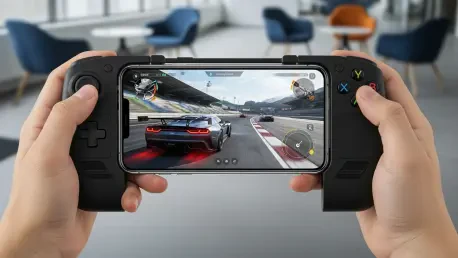
Storage capacity and speed also play a vital role in the overall quality of the mobile gaming experience, as Xbox 360 titles are notoriously large compared to native mobile applications. A single game can occupy anywhere from 6GB to 15GB of space, meaning that a device with limited storage will quickly become full after only a few installations. Furthermore, using a device with UFS 4.0 or higher storage speeds ensures that game assets load quickly, reducing the wait times during transitions between levels or during initial boot-ups. While touch-screen controls are often provided as a default interface, they are generally insufficient for the fast-paced action of console titles. Utilizing a low-latency Bluetooth gamepad or a specialized mobile controller cradle is highly recommended to provide the tactile feedback and precision required for games designed for a traditional dual-stick layout.
5. Resolving Technical Performance Hurdles and Optimization
Even on the most advanced mobile hardware available from 2026 to 2028, users may encounter performance issues like thermal throttling or frame rate drops during particularly intense scenes. When a device begins to overheat, the operating system automatically lowers the clock speed of the processor to protect the internal components, which results in an immediate and noticeable decline in game performance. To mitigate this, many users employ external cooling fans or play in shorter sessions to keep temperatures within an optimal range. Within the emulator settings, reducing the rendering resolution from 1080p back to the original 720p can often provide the necessary headroom to maintain a steady sixty frames per second, even during heavy combat or high-speed racing sequences.
Software-related issues such as audio crackling or graphical flickering are often addressed by toggling specific “hacks” or experimental features within the emulator’s configuration menu. These settings allow the software to skip certain non-essential cycles or use simplified math for specific effects, which can bypass bugs that haven’t yet been fully patched in the emulator’s core code. If a game consistently crashes at a specific point, checking the community forums for a “title update” or a specific patch file is a common and effective troubleshooting step. It is also important to keep the mobile operating system updated, as newer drivers for the GPU often include optimizations that can directly benefit the translation layers used by emulation software. Maintaining a clean background environment by closing unnecessary apps also ensures that the maximum amount of system resources is dedicated to the gaming session.
6. Future Considerations for Handheld Console Integration
The journey of optimizing mobile hardware for seventh-generation console titles reached a significant milestone in 2026, proving that the gap between portable and stationary gaming has largely closed. Moving forward, the focus shifted from basic compatibility to the refinement of the user experience, including the integration of cloud-based save synchronization and cross-platform play. Users found that by investing in high-quality peripherals and maintaining their software libraries, the mobile device became more than a communication tool; it functioned as a comprehensive historical archive of gaming’s most influential era. The lessons learned from the challenges of simulating complex architectures provided developers with the insights needed to create even more efficient translation layers for subsequent generations of technology.
Actionable progress in this field was driven by the adoption of standardized graphics APIs which allowed for better hardware utilization across different brands of smartphones. As individuals transitioned their gaming habits, the importance of maintaining digital backups of physical media became a standard practice for preserving personal collections against hardware failure. This shift encouraged a more proactive approach to device management, where users prioritized thermal efficiency and high-speed storage in their purchasing decisions. Ultimately, the successful deployment of console-grade software on mobile platforms established a blueprint for the future of ubiquitous computing, where the specific hardware at hand mattered less than the software’s ability to adapt and deliver a consistent high-fidelity experience across any screen size.