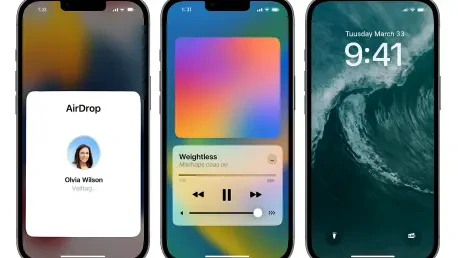

Apple has initiated the rollout of iOS 26.2 for a range of devices, including the iPhone 11 and second-generation iPhone SE and all subsequent models, introducing a series of thoughtful refinements rather than a revolutionary overhaul that redefines the user experience. This update focuses on enhancing the daily user interaction by polishing the new Liquid Glass interface, bolstering the privacy of AirDrop for interactions with unknown contacts, and expanding Apple Music’s functionality with the highly anticipated addition of offline lyrics. While not a blockbuster release packed with headline-grabbing features, iOS 26.2 delivers subtle but significant improvements to the elements users interact with most frequently, from the moment they glance at their Lock Screen to how they share files and enjoy their music on the move. These quality-of-life adjustments collectively contribute to a more seamless, secure, and intuitive mobile experience, demonstrating a commitment to refining core functionalities based on practical user needs.
1. Liquid Glass Lock Screen Polish With Opacity Controls
The latest update brings a notable enhancement to the Liquid Glass aesthetic, first introduced in iOS 26.1, by providing users with more precise control over the Lock Screen’s appearance. A new slider now allows for the adjustment of the clock’s opacity, a seemingly minor change that has a significant impact on personalization and legibility. This feature directly addresses a common challenge where beautiful portrait wallpapers were often obscured by a stark, solid clock. With this control, users can dial down the translucency to let background details and highlights subtly show through, or they can maintain a fully opaque clock for maximum contrast and readability. This level of granular control is a step up from the simple Clear/Tinted toggle that shipped in the previous version, offering a more sophisticated way to balance aesthetic appeal with functional clarity. This refinement ensures that the Lock Screen is not only more visually pleasing but also more adaptable to individual preferences and wallpaper choices.
Beyond the Lock Screen, the Liquid Glass design language continues to be woven into the fabric of the operating system, creating a more cohesive and visually dynamic user interface. System utilities such as the Measure app are now adopting this material aesthetic, which intelligently reacts to depth and light cues to create a more immersive experience. This evolution mirrors Apple’s historical design philosophy, which has transitioned from the tactile feel of skeuomorphism to the layered translucency of earlier iOS versions. The emphasis here is on providing users with intuitive visual feedback. From a usability standpoint, these small improvements in readability and visual hierarchy can lead to tangible gains in efficiency. Usability studies have consistently shown that even minor increases in contrast and clarity can reduce interaction times. For individuals who unlock their devices dozens of times a day, especially in variable lighting conditions like a daily commute or outdoor work, these shaved seconds accumulate into a noticeably smoother and faster experience over time.
2. Sharing Tightens With One Time Codes in AirDrop
In a significant move to enhance user privacy and security, iOS 26.2 introduces a code-based verification step for AirDrop transfers with individuals not in the user’s contacts. This new system requires the recipient to generate a one-time AirDrop code on their device, which the sender must then either scan or enter manually to initiate the file transfer. Once this verification is complete, the two devices establish a temporary trust window, allowing for seamless AirDropping between them for the next 30 days before the connection automatically expires. This feature is a direct extension of Apple’s multi-year effort to combat the nuisance of AirDrop spam in public settings. It builds upon the “Everyone for 10 Minutes” limitation by providing a more robust and intentional method for approving ad-hoc transfers, effectively putting an end to unsolicited or malicious content from anonymous senders in crowded environments like airports, cafes, or public transit.
The implementation of one-time codes aligns with long-standing recommendations from cybersecurity experts, who have advocated for out-of-band verification methods to prevent misdirected file shares and spoofed device names. Apple’s approach successfully maintains the lightweight and convenient flow that makes AirDrop popular while grounding the process in explicit user consent. This new security layer also provides significant benefits in professional and educational contexts. For enterprise IT administrators managing shared devices or event organizers facilitating content sharing at trade shows, this feature offers a more practical and secure workflow. For example, a presenter can safely allow a booth visitor to receive a 4K demo video without having to approve every random AirDrop request from the crowded exhibit hall. Furthermore, it introduces a clearer audit trail for IT departments, a crucial consideration for organizations prioritizing data security and device management, as highlighted by trends in enterprise deployment.
3. Offline Lyrics in Apple Music for On The Go Listening
Apple Music receives a highly requested feature in iOS 26.2 with the introduction of offline synced lyrics, allowing subscribers to view time-aligned lyrics for their favorite songs even without an active internet connection. This enhancement is particularly beneficial for users during travel, whether on a flight, an underground subway, or in rural areas with unreliable cellular service. Once a track has been downloaded to the device, the synced lyrics become available locally, transforming the offline listening experience from a passive one to an interactive one. This means that popular features, such as karaoke-style sing-alongs, are no longer restricted to environments with Wi-Fi or a strong data signal. Users can now fully engage with their music library anywhere, at any time, making long journeys and commutes more entertaining. To use this feature, users should download an entire album or playlist in advance and confirm that the “View Full Lyrics” option is available for the desired tracks before going offline.
While the addition of offline lyrics is a significant user-facing improvement, it’s important to note that coverage may vary across the vast Apple Music catalog. The availability of timed lyrics is dependent on agreements with rights holders, though Apple has been steadily increasing its lyric support over recent years. From an industry perspective, this feature is a strategic move for one of the leading global music services. As measured by research firms like MIDiA Research, user engagement and subscription retention are critical metrics in the fiercely competitive music streaming market. Features that enhance the user experience in common scenarios, such as travel, can directly influence listening hours and reduce subscriber churn. By making the platform more functional and enjoyable in offline situations, Apple Music strengthens its value proposition and encourages users to build and interact with their downloaded libraries, increasing their investment in the ecosystem. This seemingly simple addition is a calculated step to maintain a competitive edge.
4. Quality Of Life Extras Round Out The Build
Beyond the major updates to the interface, sharing, and music, iOS 26.2 introduces several smaller yet impactful quality-of-life improvements. The Reminders app, a core productivity tool for many, gains a useful new capability with an optional “Urgent” alarm that can be toggled when creating a task. This provides a more insistent notification for time-sensitive to-dos. Complementing this is the integration of a Live Activity countdown directly on the Lock Screen, which not only displays the time remaining for a task but also offers quick actions to complete or reschedule it without unlocking the device. While these may seem like minor tweaks, they have significant behavioral benefits, making it easier for users to stay on top of their schedules and manage tasks with greater efficiency. By bringing crucial information and actions to the forefront, these changes reduce friction and help ensure that important deadlines are not missed.
The update also includes features tailored to specific regions, reflecting a nuanced approach to global software development. For users in the European Union, iOS 26.2 introduces live translation capabilities for AirPods, a feature that aligns with regional regulations emphasizing transparency and user control over data and communication services. This enhancement provides real-time language assistance directly through the user’s earbuds, catering to the multilingual environment of the EU. Meanwhile, in the United States, the update brings Enhanced Safety Alerts, which can deliver critical guidance and information during emergencies such as floods or earthquakes. This addition is part of Apple’s broader, ongoing push to position its devices as indispensable safety tools, leveraging their connectivity and sensor capabilities to provide timely assistance in critical situations. These region-specific updates demonstrate how the platform is evolving to meet diverse regulatory landscapes and user needs across different markets.
5. Availability And Installation Guidance
The iOS 26.2 update is now available as a free download for a wide range of devices, specifically the iPhone 11, the second-generation iPhone SE, and all models released subsequently. Before proceeding with the installation, it is strongly recommended to perform a full backup of the device to safeguard personal data. The update process itself is straightforward. Users should first ensure their iPhone has at least 50% battery life or is connected to a power source to prevent interruption. To initiate the update, navigate to the Settings app, tap on “General,” and then select “Software Update.” The device will then check for the update, and users can follow the on-screen prompts to download and install it. It is worth noting that the download size may vary depending on the specific iPhone model and the version of iOS it is currently running. Adhering to these steps will ensure a smooth and secure transition to the latest software version.
Early assessments and developer notes following the release of iOS 26.2 indicated that the update was a stable build, free from widespread performance regressions. The installation proved to be a clear recommendation, particularly for those already utilizing the Liquid Glass interface from the previous version, as the new Lock Screen controls alone offered a compelling reason to upgrade. Ultimately, this software release was not defined by flashy, revolutionary features but by its intelligent and practical refinement of the core functions users engage with every day. The enhancements to what users see on their screen, how they share content with others, and how they listen to music collectively delivered a more polished, secure, and user-centric experience. It was a thoughtful update that smartly improved the daily interactions that form the foundation of the iPhone experience.