
When it comes to the complex intersection of mobile hardware and specialized display technology, Nia Christair stands as a leading voice. With an extensive background spanning mobile gaming development and enterprise hardware solutions, she possesses a unique perspective on how professional-grade tools must balance raw performance with user ergonomics. Today, we sit down with her to discuss the latest evolution in the e-reader market—the integration of color E Ink displays with robust Android 15 operating systems.
The following conversation delves into the technical and practical realities of modern color epaper tablets, examining the shift toward long-term software support and the security implications for corporate users. We explore the physical trade-offs involved in building high-performance 10.3-inch devices, including the challenges of weight and magnetic accessory design. Christair also provides a detailed look at the sensory experience of digital handwriting, the nuances of light-temperature calibration for graphic media, and the persistent bottlenecks in battery life and input latency that continue to define the E Ink experience.
Modern epaper tablets are shifting toward Android 15 with promised three-year software support. How does this newer OS impact long-term app compatibility for users, and what specific security advantages does it offer professionals who need to manage sensitive documents?
The move to Android 15 is a significant milestone for the E Ink industry because it finally aligns these specialized devices with the mainstream mobile lifecycle. In the past, hardware like the Note Air series often launched with aging software, but having three years of guaranteed support ensures that productivity apps like Microsoft Teams or Slack won’t become “legacy” overnight. From a security standpoint, professionals benefit from the latest encryption standards and more granular permission controls, which are vital when handling sensitive corporate PDFs or proprietary designs. This version of the OS also allows for a more seamless integration with the Google Play Store, making it easier to deploy enterprise-level device management protocols. Ultimately, it transforms the tablet from a simple digital notepad into a versatile, secure endpoint that can actually keep pace with a modern workflow for several years.
At 440g, a 10.3-inch color tablet is significantly heavier than thinner grayscale models. When prioritizing portability, how should one balance the added weight of color layers and frontlights against ergonomic comfort during long reading sessions?
The weight increase is a physical reality of the technology; the 440g of a color device like the Note Air5 C is a noticeable jump from the 375g you see in a light, monochrome tablet like the Boox Go 10.3. When you add a glass screen, the Kaleido 3 color layer, and the necessary LEDs for a frontlight, the device inevitably becomes a two-handed tool for any session lasting longer than 30 or 40 minutes. For many users, the “cold” feeling of a metallic chassis adds a sense of premium durability, but it can lead to hand fatigue if you’re used to the featherweight feel of a standard e-reader. I suggest that if your primary goal is portability and one-handed reading in bed, a lighter grayscale model is still the champion. However, if you need the functional utility of color for marking up documents, you have to accept that you’ll likely need a stand or a desk-bound setup to manage the bulk comfortably.
The latest Boox Pen 3 features an integrated storage compartment for three replacement nibs. Beyond the convenience of having spares, how do the pen’s balance and felt-tip friction affect the tactile feedback when writing on a glass-topped E Ink screen?
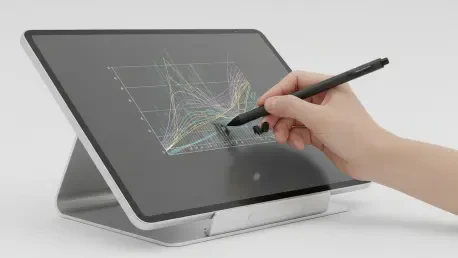
The Boox Pen 3 is a fascinating piece of hardware because it successfully mimics the sensory feedback of an actual pen, even down to the “audible scratch” you hear when the felt tip moves across the glass. It’s remarkably well-balanced despite the storage cap on top, and the friction provided by the felt nib prevents that slippery, “ice-skating” feeling often associated with plastic styluses on glass. There is a slight, disconcerting gap between the pen tip and the digital ink due to the LED layers, but the zero-lag response of the Snapdragon 690 chip makes the writing feel incredibly immediate. While the storage cap can feel a bit loose if not snapped on perfectly, the convenience of having three spare nibs tucked away is a massive win for heavy note-takers. It ensures that even during a long day of field work or back-to-back meetings, you’re never left with a worn-out tip and a useless stylus.
E Ink Kaleido 3 provides 300ppi for monochrome text but drops to 150ppi for color, sometimes resulting in muted tones. How can users best adjust frontlight brightness and temperature to maximize contrast for image-heavy files like graphic novels?
Maximizing the Kaleido 3 display is all about finding the right balance between the frontlight and the ambient environment, as color saturation can often feel a bit “washed out” compared to traditional LCDs. For image-heavy content like graphic novels, I’ve found that setting the frontlight to high brightness with absolutely no warmth provides the best contrast, as adding yellow tones can further dull the already muted color palette. It’s important to remember that at mid-level brightness, the screen can appear much darker than expected, a quirk common in this specific screen tech. If you’re reading something like “The Sandman,” you might notice the tones aren’t as vivid as on a specialized Gallery 3 screen, but keeping the light “cool” helps sharpen the 150ppi color elements. Ultimately, users should use custom light presets rather than the “Soft” or “Bright” defaults to dial in the exact clarity required for their specific document.
While a Snapdragon 690 CPU improves general speed, some users experience latency when using physical keyboard folios via pogo pins. What technical bottlenecks cause this lag in epaper environments, and what steps can be taken to improve the touch-typing experience?
The bottleneck isn’t necessarily the Snapdragon 690’s processing power—which benchmarks at a respectable 576 for single-core—but rather the communication overhead between the pogo pins and the E Ink refresh rate. When you’re touch-typing on a physical keyboard folio, the screen often struggles to keep up with the rapid input, leading to a lag that can be quite jarring for fast typists. Interestingly, I’ve observed that using a high-quality Bluetooth keyboard often results in less latency than the dedicated magnetic pogo-pin folios. To improve the experience, users should ensure they are using the “Fast” or “Ultrafast” refresh modes specifically designed for typing and browsing. If the lag remains too intrusive, switching to the on-screen keyboard for shorter entries might actually be less frustrating than trying to force a high-speed typing session on a hardware connection that isn’t fully optimized.
A 3,700mAh battery in an Android-based device often necessitates recharging every few days. To extend uptime, which background processes or connectivity settings should be disabled first, and how drastically does high-brightness lighting accelerate the daily battery drain?
Android is a power-hungry operating system, and on a device with a 3,700mAh battery, every percentage point counts. To extend your uptime from three days to perhaps a full week, the first step is to disable Wi-Fi and Bluetooth when they aren’t actively in use, as these constant background scans are silent killers of E Ink battery life. Lighting is the second major factor; for instance, reading at mid-brightness might only drop your battery by 2% per hour, but bumping it to full brightness can more than double that drain to 5% per hour. Note-taking is even more intensive, with power consumption jumping from 8% to 10% per hour depending on your brightness settings. If you’re planning a long stint away from a charger, keep your brightness low and stick to native apps like NeoReader, which are far better optimized for battery efficiency than third-party browsers or streaming apps.
Some folio designs utilize magnetic flaps or pogo pins that can interfere with the placement of the stylus or page-turn buttons. In terms of daily workflow, how can these design quirks be managed, and what alternative cases or stands provide better stability?
The design of modern magnetic folios can definitely be a double-edged sword, particularly when a removable flap feels insecure or shifts with the slightest touch. One of the most annoying quirks is that the ideal magnetic mounting point for the stylus often completely obscures the lower page-turn button, forcing a choice between accessibility and security. For a more stable workflow, many power users are turning to third-party sleeve-style cases or universal tablet stands that don’t rely on finicky magnets. If you must use the official folio, I recommend training yourself to hold the device by the larger bezel and using your free hand for the buttons, rather than attempting one-handed operation. It’s also worth considering a dedicated stylus holder or a folio with a physical loop, as the built-in magnets simply aren’t strong enough to prevent the Pen 3 from being knocked loose in a bag.
What is your forecast for color epaper technology?
I believe we are on the verge of a major divergence in the market where we will see a clearer split between “utility color” and “vibrant color” devices. We will likely see more manufacturers move toward technologies like E Ink Gallery 3 for better saturation in high-end devices, while Kaleido 3 will remain the workhorse for affordable, versatile Android tablets. My forecast is that within the next two years, we will see significant improvements in refresh rates that will finally eliminate the typing lag we currently see with physical keyboards. As processors become more efficient and E Ink layers become even thinner, the “gap” between the pen and the screen will vanish, making the writing experience indistinguishable from traditional paper. For the reader, this means more vibrant book covers and faster, more responsive apps, finally bringing the “magic” of E Ink into a truly modern, high-speed era.