


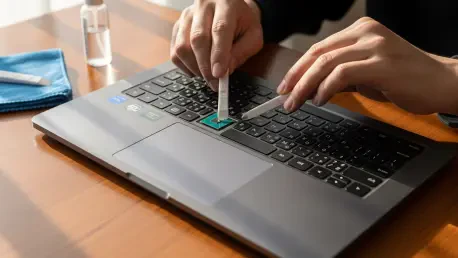

Nia Christair brings a wealth of experience in hardware design and enterprise solutions to our discussion today. As laptops often arrive cluttered with manufacturer labels, many users feel a conflict between maintaining a clean aesthetic and preserving the device’s integrity. Throughout our conversation, we explore the nuances of laptop “de-badging,” ranging from the impact on resale value to the legal complexities of regional warranty seals. Nia provides a technical perspective on how to safely manage these stickers without compromising the machine’s long-term utility or your consumer rights.
Many laptops ship with advertisements for the processor or operating system. How does removing these aesthetic stickers impact the user experience and the long-term value of the machine?
Stripping away those flashy badges can significantly improve the tactile and visual experience of your device, giving it a sleek, professional look that isn’t cluttered by corporate branding. However, you must weigh that “clean” feeling against the potential friction of a future resale where buyers look for those original markers. Many secondary market buyers feel a sense of security when they see the original factory stickers, as it provides a quick, physical confirmation of the internal GPU or CPU specs without having to boot into the system information. While a savvy user knows you can verify everything through the operating system, a pristine, factory-standard appearance often helps a machine look more “authentic” to a casual buyer. If you do choose to peel them, doing so early prevents the “shadowing” effect where the surrounding plastic fades over time while the area under the sticker stays brand new.
Beyond the logos on the palm rest, there are often technical labels on the underside of the device. What risks do users face if they decide to clear off serial numbers or model identifiers?
Those labels on the bottom of the chassis are far more than just visual clutter; they serve as the physical DNA of your specific piece of hardware. While most of this data, like the serial number, is baked into the BIOS or visible within the technical menus of the operating system, having it physically printed is a lifesaver if your screen dies or the motherboard fails to boot. If you cannot access the software, that tiny sticker becomes your only reliable way to identify the exact parts needed for a repair or to file a support ticket with the manufacturer. It is a common mistake to think these are just for show, but losing that physical record can create major headaches during a technical crisis. I always recommend taking a high-resolution photo of the bottom of your laptop before you even think about peeling anything away to ensure you have a backup of that technical information.
There is a lot of confusion regarding “warranty void if removed” seals. Could you clarify the legal landscape and how these stickers actually affect a consumer’s right to repair?
The legal reality of those intimidating “warranty void” stickers is actually quite different from what many manufacturers would like you to believe. In the United States, the Federal Trade Commission has made it clear that these stickers are generally illegal and cannot be used to deny you service for simply opening or modifying your own device. Across the Atlantic, the EU provides a similar safety net, guaranteeing users at least 2 years of protection for warranties or repairs regardless of whether a seal has been broken or a sticker has been peeled. That said, outside of these specific regions, policies vary wildly, and you might find yourself in a difficult position if a local technician uses a missing sticker as an excuse to deny a claim. It is always a bit of a gamble if you travel frequently or live in a region with less robust consumer protections, so double-checking local laws is a vital first step.
If a user decides to proceed with removal, what is the best approach to ensure the chassis isn’t damaged by stubborn adhesive or harsh chemicals?
The key to a clean removal is patience and using the right cleaning agent to break down the adhesive bond without eating through the laptop’s finish. You will generally want to use a mild abrasive, an oil-based substance, or a specialized solvent to ensure any sticky residue is safely lifted from the surface. Using your fingernails or metal tools can be tempting, but a plastic pry tool or a soft microfiber cloth is much safer for avoiding permanent scratches on aluminum or plastic palm rests. Once the sticker is off, you will often be left with a tacky, gray film that requires a few gentle passes with your solvent to fully disappear. It is a satisfying DIY project that can make a machine feel truly yours, but if you rush the process, you might end up with an unsightly smear that looks worse than the original advertisement.
What is your forecast for the future of laptop hardware branding and the “right to repair” movement?
I believe we are heading toward a future where “sticker-heavy” laptops will become a relic of the past as consumer demand for minimalism and repairability continues to grow. With more pressure from the Federal Trade Commission and global regulators, manufacturers are slowly realizing that building brand loyalty through quality is more effective than cluttering a chassis with advertisements that users just want to scrape off. We may see more “clean” editions of hardware, or perhaps branding that is laser-etched directly into the casing rather than applied with cheap, messy adhesives. As the right-to-repair movement gains momentum, the transparency of hardware specifications will likely move entirely into digital signatures or permanent physical markings, making the old-fashioned “warranty void” sticker completely obsolete. Ultimately, the industry is moving toward a model where the user has far more control over both the look and the longevity of their personal devices.







