
Nia Christair is a leading voice in the mobile and personal computing space, bringing years of hands-on experience in app development, hardware design, and enterprise solutions. As market pressures reshape the tech landscape, her ability to identify high-value hardware in a sea of premium-priced devices has made her an essential resource for consumers. Today, we explore how modern laptop architectures and AI-driven features are redefining what a budget machine can achieve.
The following discussion examines the current state of consumer electronics, focusing on how specific hardware choices—like ARM-based processors and high-refresh-rate displays—are migrating from flagship devices to more affordable models. We also dive into the practical realities of portability, port selection, and the benchmarks that truly matter for daily productivity.
Market prices for electronics are climbing in 2026 due to component shortages. How can a $700 laptop still offer competitive performance, and what specific trade-offs should budget-conscious buyers look for when comparing these options to premium machines?
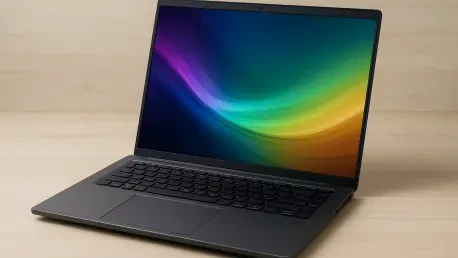
In a market where AI-fueled memory shortages are driving up costs, a $700 machine stays competitive by balancing core performance with sensible compromises. You can find models equipped with 16 GB of LPDDR5X RAM and a 512 GB PCIe Gen 4 SSD, which are metrics that would have been premium just a few years ago. The trade-offs usually appear in the display resolution, where you might see a 1,920 x 1,200 resolution instead of 4K, and brightness levels peaking at around 350 nits. While these specs handle document work and web browsing flawlessly, they won’t offer the razor-sharp visual fidelity found in machines costing double the price. It is about choosing a device that meets high evaluation standards for reliability and owner satisfaction rather than chasing every top-tier spec.
This specific model utilizes an 8-core Snapdragon X processor to power various Copilot+ AI features. What are the practical benefits of ARM-based chips for everyday multitasking, and how does this architecture impact battery life?
The shift to ARM-based architecture, like the 8-core Snapdragon X, is a game-changer for battery efficiency because these chips are designed to do more work with significantly less power. In a typical workday, a user might start their morning by using Copilot+ AI to summarize a long chain of emails, then move into a video call where the 1440p webcam uses AI to keep them centered and blur the background. Because the chip manages these tasks so efficiently, the laptop doesn’t generate excessive heat or drain the battery rapidly. This architecture allows a user to move from a morning of heavy multitasking to an afternoon of document editing without reaching for a charger, providing a level of endurance that traditional chips often struggle to match.
Large 16-inch displays with 120Hz refresh rates were once reserved for high-end models. How does this screen quality affect the user experience during long work sessions, and how does the inclusion of a dedicated numpad influence overall ergonomics?
A 120Hz refresh rate on a 16-inch screen makes a massive difference in reducing eye strain because motion—like scrolling through a spreadsheet or a long article—appears much smoother. This large canvas, often featuring 100 percent sRGB coverage, ensures that colors remain accurate even if the resolution isn’t at the absolute peak of the market. Ergonomically, the inclusion of a dedicated numpad is a significant win for anyone dealing with data entry or financial software, as it mimics the feel of a full desktop keyboard. I’ve found that while 350 nits of brightness is perfectly adequate for a well-lit office, you might feel the limitations if you try to work on a sunny patio, where the glare can start to wash out the screen.
Many modern laptops are removing physical ports, yet some devices retain microSD slots and multiple USB-A connections. Why is maintaining a diverse port selection still critical for productivity, and what specific workflows benefit most from having built-in HDMI 2.1?
While the industry is pushing toward a wireless future, a diverse port selection remains the backbone of a truly productive workflow. Having two USB-C and two USB-A ports means you don’t have to carry a bag full of dongles just to plug in a mouse or a legacy thumb drive. The inclusion of an HDMI 2.1 port is particularly critical for professionals who need to connect to high-resolution external monitors or projectors for presentations without losing signal quality. Even a microSD card slot, which many manufacturers view as redundant, is a lifesaver for quickly offloading photos or expanding storage without opening the chassis.
Users often have mixed feelings about a 3.4-pound weight and the performance of integrated webcams. What benchmarks should people use to determine if a mid-range laptop is truly portable, and how can they verify hardware reliability before purchasing?
Portability is subjective, but for a 16-inch laptop, a weight of 3.4 pounds is actually quite impressive and fits the criteria for a machine you can carry between meetings. When judging “good” battery life, you should look for a device that can survive at least 10 to 12 hours of continuous web browsing or office tasks in independent testing. To verify reliability, I always suggest looking at aggregate user ratings—aiming for at least a 3.9 out of 5—and checking for “Recommended” labels from testing organizations that evaluate predicted reliability and owner satisfaction. A high-quality 1440p webcam is a great indicator of a modern build, as it shows the manufacturer hasn’t cut corners on the essential tools needed for remote work.
What is your forecast for the budget laptop market?
I predict that the “budget” segment will continue to move toward high-efficiency ARM processors as the standard, effectively ending the era of the low-performing, “cheap” laptop. We are reaching a point where a $700 investment will consistently provide the AI capabilities and 12-hour battery life that were exclusive to $1,500 machines just two years ago. However, as component prices fluctuate, consumers will need to be more vigilant, looking for those specific models that maintain a high port count and screen quality despite the rising costs of memory and storage. The gap between budget and premium is closing, and the real winners will be users who prioritize functional ergonomics over brand prestige.