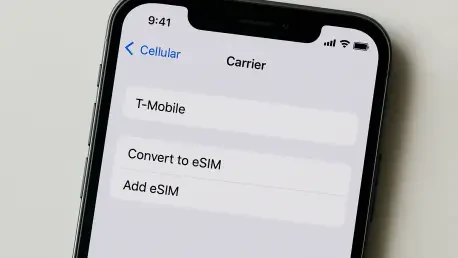

The sudden disappearance of the Add eSIM button following a major iOS update often creates a significant barrier for users attempting to manage their cellular connectivity or activate new service plans. When this interface element vanishes, it typically indicates that the mobile operating system has encountered a synchronization error between its core cellular framework and the underlying hardware drivers. Users may find that their previously active lines have also turned gray or disappeared entirely, leading to concerns about permanent hardware damage or account termination. However, these issues are frequently rooted in how the software re-indexes network configurations during the boot cycle after an update. In some instances, Apple may have simply renamed the menu options to better align with international carrier standards, leading to confusion for those accustomed to specific phrasing in earlier versions of the software. Understanding the nuances of these technical shifts is essential for restoring functionality without resorting to invasive device resets or unnecessary visits to a service center.
1. Refreshing Cellular Services and System Power
Checking the specific labels within the settings menu serves as the foundational step in identifying whether a functional change or a naming convention shift has occurred. Apple occasionally updates the terminology in the cellular menu, replacing “Add eSIM” with “Set Up Cellular” or “Cellular Data” depending on the regional firmware profile assigned to the device. Navigating to the cellular section of the Settings app allows for a thorough inspection of the available options; if a previously active number appears but remains disconnected, toggling the “Turn On This Line” switch can force the system to re-authenticate with the network. This simple reset of the software toggle often triggers the missing button to reappear as the device re-establishes its handshake with the carrier’s provisioning servers. It is vital to ensure that the primary line is correctly identified before attempting deeper modifications, as many connectivity glitches are surface-level display errors rather than deep-seated configuration failures.
Implementing a network refresh through airplane mode and a complete system restart provides a clean slate for the device’s cellular daemons to initialize correctly. By engaging airplane mode for at least fifteen seconds, the iPhone is forced to disconnect from all radio frequencies, which clears the temporary cache of the modem firmware. Following this with a hard restart, executed by navigating through the general settings to the shut-down command, ensures that all system-level processes are terminated and reloaded in the proper sequence upon boot. This sequence is particularly effective when the internal cellular services have hung during the initial update process, which is a common occurrence when large firmware files are unpacked and installed over an existing file system. Once the device returns to the home screen and establishes a stable Wi-Fi connection, the cellular settings menu should be revisited to verify if the missing setup buttons have returned to their expected locations, allowing for the continuation of plan management or activation.
2. Installing Critical Public Software Patches
Maintaining the most current version of the public operating system is a critical strategy for resolving persistent bugs that might have been introduced in an initial release. When a specific build of iOS contains a known issue affecting cellular hardware communication, developers typically prioritize a rapid patch to address these connectivity regressions. Users should verify that they are running the latest stable public release by checking the software update section under general settings while ensuring the device is connected to a reliable power source and a high-speed Wi-Fi network. It is important to distinguish between developer betas and public releases, as the former may contain experimental code that purposefully alters the cellular interface for testing purposes. If an update is available, installing it provides the latest carrier bundle and system optimizations that can rectify a missing eSIM interface by overwriting corrupted configuration files with verified data structures from the official update servers.
Confirming the installation success and verifying the final build number through the device information screen ensures that the system is operating on the intended architectural foundation. After the iPhone completes its update cycle and restarts, navigating to the “About” section allows users to verify that the version matches the most recent documentation provided by the manufacturer. If the software is already up to date and the button remains missing, the problem likely resides within the specific hardware configuration or carrier-side provisioning rather than the global operating system code. This verification step is essential because it eliminates the possibility of a “zombie” update, where the phone appears to have updated but failed to apply critical patches to the modem firmware. Keeping a record of the specific version number also assists in communicating with technical support agents, as they can cross-reference the build against known reported issues within their internal databases for more targeted troubleshooting.
3. Assessing Model Compatibility and Hardware Identifiers
Investigating the specific model code and hardware identifiers provides insight into whether the device supports the intended eSIM configuration in its current regional state. By tapping the model number in the system information menu, users can reveal the “A” prefix code, which defines the physical hardware limitations and regional cellular radio support for that specific unit. Certain models manufactured for specific markets, such as mainland China or special economic zones, utilize dual physical SIM trays instead of an internal eSIM chip, meaning the software button will never appear on those units regardless of the update version. If the device previously supported digital plans but no longer shows the option, checking for the presence of the EID and IMEI numbers is paramount. The absence of an EID string often points to a communication failure between the logic board and the secure element, suggesting that the software cannot “see” the hardware required to host a digital cellular profile, requiring professional diagnostic tools.
Reviewing the carrier lock status and any active management profiles can reveal external restrictions that prevent the eSIM interface from functioning as expected. A device that is locked to a specific provider may hide the activation button for alternative carriers, even if the primary hardware is capable of supporting multiple digital lines simultaneously. Furthermore, if the iPhone is managed by an organization through a Mobile Device Management (MDM) system, administrators may have pushed a policy that restricts the addition of new cellular plans to ensure security and cost control. Navigating to the VPN and device management section allows users to see if any configuration profiles are active; if a management profile is present, only the IT administrator can lift the restrictions on the cellular menu. This oversight is a frequent cause of missing settings in corporate environments, where software updates may trigger a re-application of strict security policies that were previously dormant or bypassed during earlier versions of the operating system.
4. Coordinating With Carriers and Remote Diagnostics
Updating the carrier settings manually can bridge the gap between the iPhone’s operating system and the wireless carrier’s specific infrastructure requirements. These settings files contain essential data regarding APN configurations, roaming preferences, and, most importantly, instructions for the eSIM setup interface. By staying on the “About” screen for a short period while connected to a network, users can trigger a prompt for a carrier settings update if one has been released to coincide with the latest firmware. If no prompt appears, contacting the service provider directly remains the best course of action to ensure that the digital plan is still correctly assigned to the device’s EID and IMEI in their backend systems. Sometimes a carrier may need to “push” a new activation token to the device to force the setup button to reappear, especially if the previous digital SIM profile was corrupted or deleted during the migration of data during the update process.
Utilizing integrated diagnostic tools or reaching out for manufacturer support represents the final stage of troubleshooting for a missing cellular interface. On more recent versions of the mobile software, the support application provides an automated diagnostic suite that can specifically test the cellular modem and its ability to interact with the digital SIM secure element. If these tests return a failure or if the modem firmware version appears as blank in the settings, the issue is likely a hardware-level failure that occurred during the thermal stress of the update installation. Gathering all relevant system information, including the specific fields that are missing and the findings from the carrier, allows for a more efficient conversation with authorized technicians. Before pursuing any hardware repair, ensuring a full cloud backup is critical, as a complete system restoration is often the first step in an authorized repair sequence to determine if the issue can be resolved through a deep-level factory firmware reinstallation.
Evolving Strategies for Cellular Connectivity
The resolution of the missing eSIM button problem ultimately required a multifaceted approach involving software recalibration and carrier synchronization. Systematic troubleshooting confirmed that while software updates occasionally disrupted the visibility of cellular menus, these glitches were generally reversible through directed resets and firmware patches. The process highlighted the importance of verifying hardware identifiers like the EID, which served as a definitive indicator of the internal modem’s health. Future considerations for maintaining reliable connectivity should involve proactive monitoring of carrier settings and the avoidance of beta software on primary communication devices. As digital SIM technology became more integrated into global telecommunications standards, the methods for managing these virtual profiles matured, offering more robust recovery options for users who encountered interface errors. Moving forward, keeping a detailed record of device model codes and maintaining a direct line of communication with service providers ensured that any future discrepancies in the cellular settings could be addressed with minimal downtime or loss of service.