
The modern corporate environment is currently defined by a relentless search for tools that can capture the fluid nature of human collaboration without succumbing to the digital distractions of traditional laptops or tablets. While the industry has seen a rise in minimalist e-paper devices designed to strip away the noise of the internet, a new philosophy is emerging that suggests a different path forward for professional documentation. Instead of retreating into an analog-style experience, the Cuneflow E-Paper Writing Tablet embraces a sophisticated fusion of high-end hardware and artificial intelligence to redefine the purpose of digital stationery. This device is not merely a replacement for a paper notebook; it is a dedicated productivity slate engineered to record, transcribe, and analyze professional interactions in real-time. By positioning itself as a central hub for business intelligence, it aims to solve the perennial problem of manual note-taking where critical insights are often lost in the transition from the boardroom to the digital database.
Premium Hardware and Build Quality
High-Density Display and Rugged Design
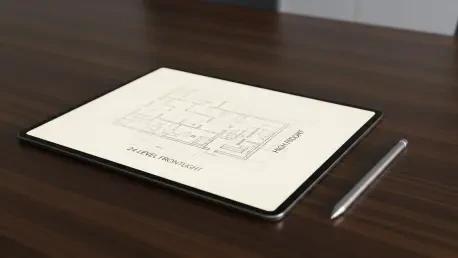
The physical foundation of this device rests on an 8.2-inch E Ink Carta 1000 display, which provides a crisp resolution of 1,920 x 1,440 pixels, making it one of the more pixel-dense offerings in the A5-sized category. Such clarity is essential for professionals who frequently switch between fine-lined architectural sketches and dense blocks of meeting minutes. To accommodate the unpredictable lighting of corporate life, from the harsh fluorescent glare of a main office to the dim ambiance of a hotel conference suite, the screen incorporates a 24-level frontlight system. This allows for precise adjustments that maintain legibility without the eye strain associated with backlit LCD screens. The hardware feels intentional and substantial, moving away from the lightweight plastic feel of consumer-grade e-readers toward something that mirrors the durability of high-end industrial design.
Construction quality further reinforces its professional positioning, featuring an aluminum unibody that provides structural rigidity while maintaining a weight of approximately 230 grams. This balance of strength and portability ensures that the tablet can withstand the rigors of frequent travel without adding significant bulk to a briefcase. Security is handled with a similar eye for professional standards, as the power button integrates a fingerprint scanner for instantaneous, biometric unlocking. This is a critical addition for users handling sensitive corporate data or proprietary information, ensuring that the contents of the device remain protected even if it is left unattended. This focus on a rugged yet refined exterior suggests that the tablet is designed to be a long-term investment for the modern worker rather than a disposable tech gadget.
Processing Power and Stylus Interaction
Beneath the sleek aluminum exterior, the device is powered by a 2 GHz dual-core ARM system-on-a-chip, paired with 4GB of RAM to ensure smooth operation during resource-intensive tasks. While e-paper tablets are not typically known for high-speed processing, this particular configuration is necessary to handle the simultaneous audio recording and handwriting input that defines the core user experience. With 128GB of internal storage, there is more than enough room to store years of meeting transcripts, handwritten notebooks, and a massive library of reference documents. This generous storage capacity eliminates the need for frequent cloud syncing or manual file management, allowing the user to keep all their essential professional assets locally accessible at any given moment, regardless of their current internet connectivity.
The interaction between the user and the digital page is facilitated by a passive Wacom EMR stylus, which operates without the need for a battery or charging. This stylus is pressure-sensitive and includes a functional side button alongside a dedicated eraser tip, mimicking the intuitive tools found in traditional drafting. However, the choice of a thin ceramic nib introduces a unique tactile feedback that differs significantly from the soft, felt-like tips found on many competing devices. The resulting “scratchy” sensation is designed to provide a sense of precision and feedback, though it may require an adjustment period for those accustomed to the smoother glide of a graphite pencil. This design choice highlights the device’s focus on technical accuracy and durability, as ceramic nibs are far less prone to wearing down over time compared to their plastic or felt counterparts.
Software Functionality and Writing Experience
Organized Interface and Document Handling
The software architecture is deliberately segmented into two primary functional hubs labeled “Meetings” and “Files,” creating a clear cognitive boundary between active creation and passive review. Within the Meetings tab, users can generate an unlimited number of digital notebooks, which serve as the primary canvas for handwriting, mind mapping, and sketching during collaborative sessions. The interface is designed to be unobtrusive, allowing the user to focus on the content of the discussion rather than the mechanics of the device. This organization mirrors the traditional workflow of a professional who carries a notebook for thoughts and a folder for reference papers, but it consolidates both into a single, searchable digital environment that can be navigated with a few quick taps of the stylus.
Document management is handled through the Files tab, which supports standard formats such as PDF and EPUB, making it a versatile tool for reviewing reports, contracts, and research papers. To facilitate the transfer of these documents from a primary computer to the tablet, the ecosystem utilizes a proprietary web client known as Cunespace. This cloud-linked bridge allows for the seamless movement of data, ensuring that the latest versions of critical files are always ready for annotation. During actual use, the device demonstrates remarkable responsiveness; there is virtually no perceptible lag when writing at high speeds, which is a testament to the optimization of the E Ink display and the underlying processor. This fluidity is essential for maintaining professional momentum, as even a slight delay in stroke rendering can break the concentration of a user in a fast-paced environment.
Navigating Early-Stage Software Hurdles
While the hardware is undeniably premium, the current state of the software reflects the challenges of entering a highly competitive market dominated by established players. The selection of digital writing tools is currently limited to a basic pen and a highlighter, which lacks the variety of brushes and textures found on more mature platforms. Furthermore, the user interface for modifying these tools—such as changing line thickness or opacity—requires navigating a drop-down menu that feels somewhat cumbersome during active note-taking. These “fussy” interactions suggest that while the core engine is capable, the skin surrounding it requires further refinement to achieve the effortless elegance that professional users expect from their primary tools.
Specific software quirks, such as a highlighter that can inadvertently obscure handwriting rather than emphasizing it, point toward a need for more nuanced layer management within the operating system. These types of issues are common in early-stage tech products and are often addressed through iterative firmware updates, but they currently present a slight friction point in the user experience. Additionally, the lack of a system-wide landscape mode or more robust text-editing features means that the device remains primarily a handwriting-focused tool for now. For the tablet to truly fulfill its promise as a comprehensive meeting solution, the software will need to evolve into a more flexible environment that can adapt to different styles of work beyond simple vertical note-taking and basic document annotation.
AI Integration and Professional Insights
Advanced Transcription and Data Privacy
The defining characteristic of this tablet is its integration of a high-fidelity microphone and a cloud-assisted AI transcription engine, which transforms audio recordings into text with impressive speed. In a typical meeting scenario, the user can initiate a recording while simultaneously taking handwritten notes, allowing the AI to capture the verbatim dialogue while the human focus remains on synthesizing key concepts. Privacy and data security are addressed through a rigorous “transcription and purge” protocol. Once the audio is captured, it is encrypted and sent to advanced language models like OpenAI or Gemini for processing. Crucially, the original audio file is deleted from the servers as soon as the text transcript is generated, leaving only the written insights on the device and mitigating the risks associated with storing long-term audio records in the cloud.
This approach to data handling is particularly attractive for industries where confidentiality is paramount, such as legal, medical, or financial sectors. By converting speech into text and then discarding the source audio, the device provides the benefits of modern machine learning without creating a permanent, hackable repository of voice recordings. The transcription accuracy is high, allowing users to search through past meetings using keywords and find specific points of discussion without having to manually scrub through hours of audio. This functionality effectively turns every meeting into a searchable database, ensuring that decisions made in person are never forgotten or misinterpreted. It represents a significant step away from the “dumb” digital paper of the past toward a truly intelligent assistant that actively participates in the documentation process.
Automated Summaries and Actionable Data
Beyond the basic conversion of speech to text, the AI engine performs a sophisticated analysis of the meeting content to generate a dedicated “Insights” tab. This section provides the user with an executive summary of the discussion, a chronological timeline of topics covered, and a prioritized list of action items and to-do tasks. It can even identify subtle nuances such as areas of disagreement among participants or potential risks associated with a proposed project. For a project manager or a busy executive, these automated summaries can save hours of administrative work each week, providing a clear roadmap of what was discussed and what needs to happen next without requiring a manual review of the entire transcript.
However, the automated nature of these insights means that the system is occasionally prone to the “hallucinations” or errors typical of current large language models. Proper nouns, niche industry jargon, or speakers with heavy accents can sometimes lead to misspellings or contextual errors in the final transcript. Furthermore, because the original audio is deleted to protect privacy, there is no way for the user to go back and listen to the specific moment of a recording to verify a disputed piece of text. Users must therefore maintain a level of critical oversight, reviewing the AI-generated summaries while the meeting is still fresh in their minds to ensure total accuracy. Despite these limitations, the ability to generate a structured report from a chaotic group discussion is a powerful tool that significantly enhances professional efficiency.
Ecosystem Constraints and Workflow Efficiency
Connectivity and Workflow Gaps
Despite the individual brilliance of its hardware and AI features, the ecosystem currently suffers from a lack of deep integration, creating a fragmented experience when moving between different modes of work. For instance, while the AI can generate a list of checkable action items, these tasks are often static and cannot be checked off directly with the stylus or synced to a third-party task manager like Todoist or Trello. There is also a notable wall between the handwriting notebooks and the AI-generated transcripts; if a user wants to incorporate a specific AI-transcribed quote into their handwritten notes, they often have to resort to manual copying. This disconnect hinders the fluid transition of information that is necessary for a truly cohesive digital workspace, forcing the user to bridge the gaps themselves.
The Cunespace web client, while functional for file transfers, currently lacks the interactive features that would make it a robust companion to the tablet hardware. It acts primarily as a viewing portal rather than a collaborative editor, meaning that the rich data generated on the tablet remains somewhat isolated from the user’s broader digital workflow. Additionally, while the device supports external Bluetooth keyboards for those who prefer typing, the implementation requires a “fiddly” manual creation and resizing of text boxes that disrupts the speed of a professional typist. These gaps in connectivity and interaction suggest that the device is currently optimized for data capture rather than data manipulation. Future developments will likely need to focus on creating a more “joined-up” software experience where the stylus, the keyboard, and the AI insights work together in a single, unified flow.
Moving Toward a More Integrated Future
To truly capitalize on its innovative hardware, the tablet must evolve beyond a collection of disparate high-tech features and move toward an integrated solution that anticipates the user’s needs. The potential for the device is immense; imagine a scenario where a handwritten note can be instantly linked to a specific moment in an AI transcript, or where a checkmark made with the stylus automatically updates a project’s status in the cloud. Currently, the device requires the user to act as the primary integrator, but the hardware foundation is already in place to support much deeper automation. As the software matures, the focus should shift toward making the AI insights interactive and ensuring that the data generated during a meeting can be easily exported into the broader corporate software ecosystem.
The ultimate value of this technology lies in its ability to handle the administrative overhead of a professional life, leaving the user free to focus on high-level decision-making and creative problem-solving. While the initial experience may feel somewhat unpolished in certain software areas, the core premise of an AI-powered e-paper tablet is a compelling solution to the modern problem of information overload. Professionals who are willing to navigate the early-stage quirks of the system will find a device that offers a unique combination of focus and intelligence. By moving forward with a strategy that prioritizes software flexibility and ecosystem connectivity, the manufacturers can transform this promising hardware into an indispensable tool for every boardroom and home office. The journey toward this integrated future involves refining the interface to be as intuitive as the hardware is sturdy, ensuring that the technology serves the user’s workflow rather than dictating it.