
Modern mobile photography has reached a point where the distinction between a captured moment and a computer-generated image is becoming increasingly blurred. While the convenience of high-end smartphones is undeniable, a growing number of enthusiasts find the aggressive AI processing and synthetic HDR effects to be restrictive and unnatural. This fatigue has sparked a resurgence in demand for tools that replicate the tactile, honest experience of using a dedicated compact camera. The VWFNDR + MBL application addresses this by offering a minimalist Bayer RAW workflow that prioritizes a “raw” aesthetic over digital perfection. By focusing exclusively on the rear sensor and omitting the standard computational filters, the app provides photographers with a clean, authentic canvas that stays true to life. This professional utility is not just another camera app; it is a dedicated tool for those who want to recapture the intentionality of film and digital compacts. It leverages modern standards to ensure that every pixel recorded is a genuine reflection of the environment, free from the sanitizing influence of typical mobile image processing algorithms.
1. Mastering the Fundamentals of Manual Control and Image Capture
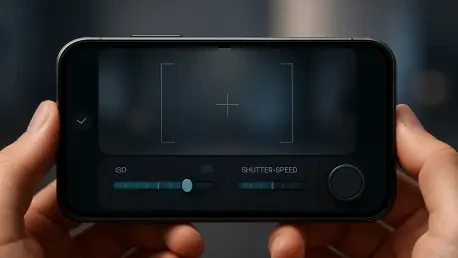
To take more intentional photos, the user must first engage with the streamlined dashboard of VWFNDR + MBL, which brings all critical shooting parameters to the forefront. When the application is opened, the main dashboard provides immediate access to the shutter button and a suite of manual controls, eliminating the need to dig through menus. This layout allows the photographer to fine-tune shooting parameters such as exposure compensation, focus, and specific exposure modes directly from the single control panel. Whether prioritizing ISO in P mode or shutter speed in S mode, the interface responds with the precision of a professional instrument. The ability to adjust these settings on the fly ensures that environmental changes are captured accurately, maintaining the natural look that is the hallmark of the app. By placing these tools in a single, accessible panel, the software encourages a more deliberate approach to composition and light management, moving away from the mindless snapping of images to a more thoughtful, artistic process.
Selecting the right framing is an essential part of the creative process, and the app facilitates this through a unique gesture-based system for aspect ratios. Users can select their preferred frame dimensions by pulling the white center handle up or down until they reach the desired setting, such as the classic 4:3, a wide 16:9, or a perfectly balanced 1:1 square. Once the frame is established and the settings are dialed in, the photographer can snap the picture by tapping the large on-screen shutter button or pressing the physical volume down key. This choice between digital and physical triggers allows for greater stability, especially in low-light situations where keeping the sensor steady is paramount. The resulting output, whether saved as a high-fidelity DNG or a standard JPEG, preserves the authentic textures of the scene without the interference of artificial sharpening. This method of capture ensures that the final image reflects the photographer’s initial vision, providing a realistic output that mirrors the behavior of a high-end compact camera.
2. Optimizing the User Experience Through Customization and Management
Efficiency in photography often depends on how well the tools fit the user’s hands, and VWFNDR + MBL allows for extensive personalization of the interface. Photographers can reorganize the button layout by long-pressing any setting element and dragging it to a new, more convenient spot on the control panel. This ensures that the most frequently used functions are always within reach of the user’s thumb, reducing the time spent looking at the screen instead of the subject. When the need arises to update the internal configuration, a simple slide of the white handle all the way to the top reveals the comprehensive Settings menu. Here, one can edit copyright information to protect their intellectual property or change the file format to suit the current project’s needs. The inclusion of various color themes also allows the interface to be adapted for different viewing conditions, ensuring that the controls remain legible regardless of the ambient light. These customization options transform the smartphone from a generic device into a specialized tool tailored to individual professional requirements.
The process of reviewing captured images is integrated seamlessly into the workflow, allowing for immediate assessment of both composition and technical execution. By pulling the white handle all the way to the bottom, the user opens the built-in gallery, where images can be viewed alongside the specific metadata and settings used for each shot. This feature is invaluable for photographers who wish to analyze how different exposure choices affected the final Bayer RAW output. Furthermore, the app incorporates C2PA standards to certify that the images are genuine and free from AI-generated alterations, a feature that is increasingly vital for maintaining credibility in the modern digital landscape. This commitment to authenticity extends from the moment of capture through to the review process, providing a verifiable record of reality. By combining a minimalist interface with robust technical standards, the software offers a complete ecosystem for realistic mobile photography. It ensures that every shot is not only high in quality but also grounded in a technical framework that values truth and transparency above all else.
3. Finalizing the Workflow for Authenticity and Long-Term Archiving
To maximize the potential of this realistic photography tool, users adopted several strategic steps that enhanced their professional output. It was found that establishing a custom control layout significantly reduced the time between spotting a subject and capturing the frame, leading to more spontaneous and natural results. For those looking to integrate these images into a larger portfolio, it was highly recommended to utilize the C2PA metadata to verify the authenticity of their work in public galleries. The transition to a RAW-only workflow necessitated the use of high-capacity external storage, which ensured that no critical data was lost during long shooting sessions. It was also determined that experimenting with different aspect ratios provided new perspectives on familiar subjects, encouraging a more diverse visual language. By focusing on the mechanical aspects of the sensor rather than the software-driven enhancements, photographers achieved a level of realism that was previously reserved for expensive compact cameras.
The long-term benefits of adopting such a minimalist approach became evident as photographers built archives grounded in technical integrity and artistic truth. It was observed that the DNG files produced by this app required more processing power for mobile editing, suggesting that a dedicated tablet or desktop workstation was necessary for the best results. Moving forward, photographers began to investigate how C2PA metadata could be leveraged to build a verified digital archive that stood against the rise of synthetic imagery. Engaging with community forums to share custom UI layouts and shooting presets provided new insights into optimizing the minimalist interface for various lighting conditions. These actions paved the way for a more disciplined and technically proficient community of mobile artists who prioritized the integrity of the photographic medium over automated convenience. By treating the smartphone sensor as a serious optical instrument, creators ensured that their digital legacy remained both authentic and professional.