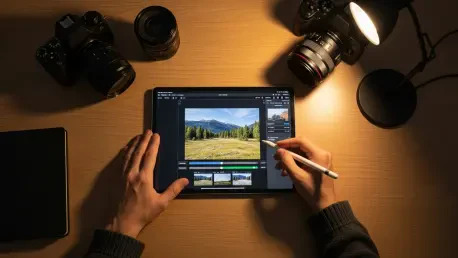

The current landscape of digital photography has undergone a massive transformation where the once-impenetrable wall between desktop-grade professional software and mobile applications has effectively vanished. As mobile hardware manufacturers continue to integrate massive sensors and high-computational processing units into every flagship device, the software ecosystem has been forced to evolve at a matching pace to accommodate these new technical capabilities. The modern smartphone is no longer viewed as a secondary device for quick, low-quality snapshots; instead, it has become a primary, sophisticated workstation capable of executing complex graphical tasks that were previously reserved for high-end desktop computers. This shift reflects a broader democratization of professional tools, allowing every user to correct, embellish, and manage expansive visual libraries while remaining entirely mobile. The priority in this current environment has shifted away from superficial filters toward robust software suites that offer precision control over every pixel, ensuring that the creative output matches the technical potential of the hardware.
The Foundations of Mobile Editing
Market Leaders: The Dominance of Google Photos
The organizational and editing capabilities of Google Photos have established it as the primary benchmark for mobile photo management in the current year. This dominance is not merely a result of its pre-installation on many devices but stems from a seamless integration of three critical pillars: organizational intelligence, cloud accessibility, and advanced AI-powered editing tools. The app’s facial recognition and object-search capabilities lead the industry, utilizing sophisticated machine learning models to allow users to locate specific people, pets, or geographical locations without the need for manual tagging or metadata entry. This level of automation addresses one of the most significant pain points in digital photography, which is the management of thousands of images captured over several years. By providing a searchable, intelligent archive, the application ensures that visual memories remain accessible rather than buried in a digital abyss. Furthermore, the integration with cloud services allows for a consistent experience across multiple platforms, making it an essential tool for those who prioritize efficiency and ease of use in their daily photography workflows.
Building upon its organizational strengths, the application has transitioned from a simple storage locker into a formidable creative powerhouse through the introduction of advanced AI features. Tools like the Magic Eraser and automated creative suggestions allow users to perform complex edits, such as removing intrusive background objects or generating cinematic depth effects, with a single tap of the screen. These features utilize generative algorithms to fill in gaps and adjust lighting in a way that feels natural and professional. However, despite these advancements, the application maintains a balance that caters mostly to general users, which sometimes results in a lack of granular control for professionals. For instance, the absence of a step-by-step undo history means that users cannot always revert specific adjustments made earlier in the editing process without resetting the entire project. While it excels at blemish removal and automated enhancements, it remains a tool designed for speed and accessibility rather than high-precision manual manipulation, serving as a reliable foundation for the vast majority of mobile photographers.
Ecosystem Specialists: The Apple Photos Experience
For individuals who are deeply integrated into the Apple hardware ecosystem, the native Photos application represents the premier choice for editing and organization. This application leverages the tight, vertical integration between iOS, iPadOS, and macOS to offer a cohesive experience that is virtually unmatched in terms of fluidity and performance. The interface is highly optimized for touch interaction, providing a slick and intuitive environment that allows users to navigate through vast libraries with minimal friction. One of the standout features of this ecosystem is the support for advanced photographic workflows, including the ability to handle high-bitrate raw files directly from the camera sensor. This allows for significant recovery of highlights and shadows that would be lost in standard compressed formats. Additionally, the system enables third-party developers to integrate their editing extensions directly into the Photos interface, meaning a user can access specialized tools from other applications without ever leaving their main library.
The strategic focus of Apple’s photo software in the current year revolves heavily around the intersection of artificial intelligence and user privacy. Unlike many competitors that rely on cloud-based processing for their machine learning tasks, Apple emphasizes on-device processing to ensure that sensitive facial recognition data and location information remain private to the user. This approach not only enhances security but also improves the speed of search queries and automatic categorizations. Despite these significant advantages, the application faces inherent limitations due to its platform exclusivity, as it remains entirely unavailable for Android users. Furthermore, the web-based interface for accessing images via a browser is notably less robust than the experience offered by Google, which can be a significant drawback for users who frequently transition between mobile devices and non-Apple desktop environments. For the loyal iPhone user, however, the deep integration with the hardware’s camera system and the consistent synchronization via iCloud make it an indispensable tool for high-quality mobile imaging.
Creative Expression and Community
Tools for Social Creators: Picsart and Polarr
The modern creative landscape recognizes that a photograph is often just the beginning of a larger visual narrative, and Picsart has firmly established itself as the all-in-one solution for this type of graphic storytelling. It caters specifically to a generation of creators who view images as dynamic assets rather than static captures. The application provides a massive array of stickers, overlays, and advanced typography options that allow users to blend traditional photography with contemporary graphic design. This multifaceted approach is particularly useful for social media content creators who need to produce eye-catching visuals that stand out in a crowded digital feed. Beyond simple color correction, the application offers sophisticated masking tools and blending modes that were once the exclusive domain of professional desktop suites. By lowering the barrier to entry for complex design tasks, it has empowered a wider range of individuals to express their creative flair and share their unique visions with a global audience.
In contrast to the broad design focus of other applications, Polarr has carved out a unique niche by prioritizing community-driven aesthetics and highly customizable filtering systems. The platform revolves around the concept of “Styles,” which are essentially advanced presets that users can create, fine-tune, and share with a worldwide network of photographers. This focus on sharing the logic behind an edit, rather than just the final image, has fostered a collaborative environment where users learn from one another’s creative choices. The application is highly efficient for those who wish to maintain a consistent visual identity across their work, as it allows for the precise application of color mapping and layering with minimal manual effort. By focusing on the “vibe” of an image through advanced technical controls, Polarr bridges the gap between the casual filter user and the professional colorist. This community-centric approach has turned the act of photo editing into a social experience, where the development of a unique aesthetic is a shared journey rather than a solitary task.
Artistic Purity: The Role of Snapseed and VSCO
For photographers who prioritize the technical integrity and artistic purity of an image, Snapseed remains the gold standard for free, high-end mobile editing. Originally developed by Nik Software and currently maintained by Google, the application offers a level of granular control that many paid subscription services fail to provide. Its “Control Point” technology is a standout feature, allowing users to make highly selective adjustments to specific areas of a photo based on color and luminance. This precision is essential for professional-grade work, such as balancing the exposure of a sky against a dark landscape or highlighting the details in a subject’s eyes without affecting the rest of the frame. The application is entirely ad-free and does not require a subscription, making it the top recommendation for budget-conscious photographers who demand a professional-grade experience. Its non-destructive editing workflow ensures that users can always go back and tweak individual steps in their process, providing a level of flexibility that is rare in the mobile software market.
While Snapseed focuses on technical precision, VSCO caters to the aesthetic-driven photographer who values the timeless look of analog film stocks. The application is widely recognized for its high-quality presets that accurately mimic the grain, contrast, and color shifts of classic film brands. However, it is more than just a collection of filters; it is a dedicated social community that intentionally lacks public metrics like “like” counts or comments to foster a healthier, art-focused environment. This design choice encourages users to share their work based on its artistic merit rather than its potential for viral engagement, creating a “troll-free” space for genuine creative expression. While many of its most iconic features and filters are locked behind a subscription paywall, the value proposition remains high for those who want their digital images to possess a certain soul and character. By combining a professional-grade editing engine with a curated social experience, it continues to attract a dedicated following of artists who are more interested in the quality of their work than the volume of their followers.
Industry Trends and Strategic Choices
Software Trajectory: AI and Professional Workflows
A synthesis of the current industry trends reveals that artificial intelligence has successfully transitioned from a marketing gimmick into a core functional utility for mobile photo editing. Users in the current year expect their applications to possess an intelligent understanding of photo content, allowing for automated tasks that were previously tedious and time-consuming. Features like intelligent object removal, skin tone optimization, and sky replacement have become standard requirements rather than luxury additions. This shift suggests that the average mobile user has become more sophisticated, demanding tools that assist in the creative process without stripping away the user’s agency. Furthermore, the rise of the “pro-mobile” photographer has pushed developers to include advanced features like tone curve adjustments and full raw file support in even the most basic applications. This indicates a broader trend where mobile software is being designed to satisfy the needs of professionals who require precision and control while working on the go.
The necessity for cloud synchronicity has also become a defining characteristic of the modern editing workflow, as the ability to start a project on a smartphone and seamlessly finish it on a tablet or desktop is no longer considered optional. Applications that fail to provide a cohesive cross-device experience are increasingly viewed as limited or obsolete in an era where creative professionals are constantly moving between different hardware environments. This demand for flexibility has led to the development of more robust cloud-based storage solutions that preserve the full editing history of an image across all devices. Additionally, there is a growing trend toward the creation of “healthier” social spaces within editing apps, where the focus is shifted toward collaborative learning and constructive feedback. By prioritizing the creative process over traditional social competition, software developers are helping to build a more sustainable and supportive ecosystem for digital artists, ensuring that the technology serves the creator rather than the other way around.
Strategic Selection: Choosing the Right Application
Selecting the most appropriate mobile editing tool in the current year requires a careful alignment of an individual’s specific needs, hardware preferences, and creative goals. For the general user who primarily wants an easy way to organize a lifetime of memories while occasionally making quick enhancements, Google Photos remains the most practical and efficient choice. Its balance of intelligent storage and “one-tap” AI tools provides the best overall value for a broad audience. In contrast, professionals who are already using iPhones will find that the native Apple Photos application offers the most streamlined experience due to its deep integration with the device’s camera and privacy-focused on-device processing. The choice of application is often dictated by the existing hardware ecosystem, as the benefits of staying within a single manufacturer’s software suite frequently outweigh the advantages of switching to a third-party alternative.
For those who view photo editing as a specialized craft, the decision-making process becomes more nuanced and focused on specific functional requirements. Social media content creators who need a versatile toolkit for both photography and graphic design will likely find that Picsart provides the most comprehensive set of “remix” tools. Meanwhile, photographers who are searching for a specific film-inspired aesthetic and a community that values artistic integrity over social engagement should gravitate toward VSCO. For the technical purist or the budget-conscious professional, Snapseed provides an unparalleled level of manual control without any financial commitment. Ultimately, the best application is the one that fits naturally into a user’s existing workflow and enhances their ability to translate their visual ideas into high-quality digital assets. By experimenting with these top-tier options, photographers can find the perfect match for their unique creative journey, ensuring that their mobile device remains a powerful tool for visual storytelling.
The mobile photo editing landscape achieved a state of remarkable maturity where high-quality results became accessible to everyone with a smartphone. As developers moved away from simplistic enhancements toward sophisticated, AI-driven suites, the gap between casual hobbyists and professional photographers narrowed significantly. This evolution was driven by a combination of improved hardware capabilities and a shift in user expectations, which demanded both speed and precision in a mobile environment. The successful integration of professional tools like raw support and selective masking into user-friendly interfaces marked a turning point for the industry. This progress ensured that the creative potential of a photographer was no longer limited by the size of their device or their proximity to a desktop computer. Future developments were poised to further refine these tools, making the digital darkroom a permanent and powerful fixture in the pocket of every user. Actionable steps for individuals included evaluating their specific workflow needs and adopting a primary organizational tool while supplementing it with specialized apps for artistic flair. By embracing these advancements, users successfully transformed their mobile devices into professional-grade creative workstations.