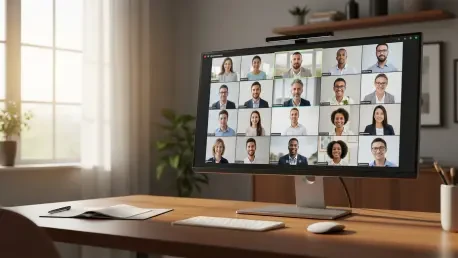

The profound shift in how professionals interact across digital interfaces has led to the rise and eventual sunset of experimental tools that once defined the remote work era. Together Mode arrived as a bold attempt to humanize pixels, using artificial intelligence to bridge the physical gap between isolated colleagues. While traditional video grids emphasized separation, this feature sought to create a collective identity within a shared digital space.
By utilizing intelligent segmentation, the platform extracted individual silhouettes and placed them into a unified virtual seating arrangement. This design choice addressed the cognitive load associated with monitoring multiple disparate backgrounds, which often contributed to significant mental exhaustion. It transformed the screen from a collection of boxes into a coherent social environment that prioritized the group over the individual.
The Genesis of Immersive Virtual Meetings
Together Mode stood out by rejecting the traditional “Brady Bunch” layout in favor of a shared backdrop that positioned participants as if they were in the same room. This psychological shift was grounded in the idea that seeing others in a common context reduces the brain’s need to process different environments. It acted as a direct response to the fatigue generated by early digital communication methods.
Moreover, the technology signaled a departure from utilitarian video conferencing toward a more holistic experience. By placing everyone in a lecture hall or a coffee shop, the software attempted to restore the social cues lost in the transition to home offices. This innovation was not merely aesthetic; it was a functional attempt to lower the barriers to authentic human connection.
Core Functionality and User Experience
AI-Powered Participant Segmentation
The technical architecture relied on real-time computer vision to distinguish between the user and their physical surroundings. This process required sophisticated edge detection to ensure that movements remained fluid and transitions appeared natural against the virtual backdrop. By removing distracting home office elements, the focus shifted entirely to the human presence and non-verbal cues.
This segmentation worked continuously to update the user’s position, allowing for a dynamic sense of presence. However, the effectiveness of this isolation depended heavily on the lighting and the quality of the camera used. When it worked seamlessly, it provided a sense of immersion that few other platforms could replicate at the time.
Diverse Virtual Environments and Spatial Awareness
Various settings like auditoriums and cafés provided the framework for these interactions, attempting to mimic the spatial physics of a real room. Participants could look toward their neighbors or share a visual reference point, which encouraged a more organic flow of conversation. This spatial awareness proved essential for maintaining the illusion of proximity during lengthy discussions.
Furthermore, these environments allowed for a sense of scale that traditional galleries lacked. In a virtual auditorium, a speaker could see the reactions of an entire audience at once, mirroring the experience of a live stage. This visual hierarchy helped maintain focus and provided a more structured way to manage large-group dynamics.
Shifting Trends in Virtual Collaboration
The landscape is currently moving away from these gamified experiments toward streamlined, high-performance interfaces. While the “metaverse for work” once seemed inevitable, the market now demands technical efficiency over immersive novelty. Standardization has become the priority, ensuring that every user has a consistent experience regardless of their hardware capabilities.
Consequently, platforms are consolidating features that offer the most value for the least amount of effort. This move marks the end of an era of trial and error, as developers identify which tools actually improve productivity. The trend emphasizes a “less is more” philosophy, where the interface stays out of the way of the actual work being performed.
Real-World Impact and Industry Application
In educational settings, this shared view helped instructors maintain eye contact with a class, fostering a stronger sense of community. Students felt more like part of a group rather than isolated learners in their own bedrooms. Large-scale corporate town halls also utilized the feature to break down the hierarchy of the screen, making leadership feel more accessible and approachable.
Beyond education, the tool found a niche in creative brainstorming sessions where a sense of shared space sparked better collaboration. By visually placing everyone at the same “table,” it removed some of the formality of scheduled calls. It successfully turned passive viewing into an active, communal experience for millions of remote participants.
Technical Constraints and Practical Limitations
Despite its innovations, the feature placed heavy demands on local processing power, often causing performance issues on older devices. The high CPU and GPU requirements meant that not all users could enjoy a smooth experience, creating a digital divide within the same meeting. The visual complexity could also lead to a cluttered appearance when too many participants joined.
Modernized Gallery views have since emerged as a more robust solution that consumes fewer system resources while offering similar benefits. By providing a clean and adaptable layout, these newer interfaces address the stability issues that occasionally plagued Together Mode. This transition reflects a necessary evolution toward software that is both inclusive and technically reliable.
The Future of the Microsoft Teams Interface
Microsoft’s strategy now emphasizes a unified productivity environment where features require fewer clicks to manage. The transition following the June retirement signals a focus on AI-driven layouts that adjust dynamically to the meeting’s context. This evolution ensures that the interface remains invisible, allowing users to focus entirely on their work rather than the tool itself.
Future developments will likely center on automated optimization, where the software predicts the best viewing mode based on the number of participants and the type of content shared. This move toward a more intelligent, self-adjusting gallery view promises to deliver the benefits of Together Mode without the technical overhead. The goal is to provide a frictionless experience that scales effortlessly across all devices.
Final Assessment of Together Mode’s Legacy
Together Mode served as a critical bridge during a period of global isolation, proving that digital tools could offer more than just basic connectivity. It paved the way for the sophisticated, automated gallery views that define the current standard of professional communication. This technology demonstrated the importance of psychological comfort in the digital workspace and set a high bar for future innovations.
The decision to retire the feature reflected a mature understanding of user needs, prioritizing performance and simplicity. Industry leaders moved toward standardized tools that offered reliable results without unnecessary flair. This transition was a successful pivot toward efficiency, leaving behind a legacy of innovation that forever changed how the world perceived virtual presence.