
Google’s most ambitious wearable software overhaul in recent memory is currently descending upon the digital ecosystem, signaling a shift in how users interact with their hardware on a minute-to-minute basis. This transition represents more than a simple aesthetic refresh; it is a fundamental reengineering of the operating system designed to bridge the gap between static information and active utility. For owners of recent Pixel Watch models, the arrival of this update marks the beginning of a more responsive and efficient era for Android wearables.
The objective of this guide is to dissect the specific enhancements arriving with Wear OS 7, providing clear answers to the questions surrounding compatibility, performance, and functionality. Readers can expect to learn how the architectural change from traditional Tiles to modular Widgets affects daily navigation and why the underlying software optimizations lead to tangible gains in longevity without requiring a hardware upgrade. Furthermore, this exploration will clarify the distinction between features available to current devices and those reserved for upcoming hardware cycles.
The scope of this content encompasses the technical specifications revealed in recent carrier documentation and the developer frameworks introduced during recent industry conferences. By examining the nuances of the new Watch Face Format and the real-time data layer, this article serves as a comprehensive resource for understanding the immediate impact of the rollout. Whether a user is looking for improved media controls or a more glanceable interface, the following sections provide the necessary context to navigate this major software milestone.
Key Questions or Key Topics Section
Which Pixel Watch Models Are Getting Wear OS 7?
The rollout of Wear OS 7 is specifically targeted at the more recent iterations of the Google wearable lineup, ensuring that the hardware can adequately support the new software architecture. According to the latest support documentation from major carriers like Verizon, the update is confirmed for the Pixel Watch 2, the Pixel Watch 3, and the latest Pixel Watch 4. These devices share a unified build number, suggesting that the deployment is being handled as a synchronized release rather than a staggered model-by-model rollout.
The presence of the June security patch alongside this update reinforces the stability of the release for these specific generations. Because these models utilize modern chipsets capable of handling the new Jetpack Glance framework, they are positioned to receive the full suite of interface improvements. Owners of these devices should prepare for a system update notification that brings their watches to the most current software standard available in the Android ecosystem.
Does Wear OS 7 Improve Battery Life on Existing Pixel Watches?
One of the most significant claims surrounding this update is a projected 10 percent improvement in average battery life achieved purely through software optimization. This enhancement is the result of a more efficient way the operating system manages background processes and wake cycles, particularly when handling the new real-time data features. By refining how the watch communicates with the phone and manages its sensor array, Google has managed to squeeze extra longevity out of the existing batteries in the Pixel Watch 2, 3, and 4.
The underlying efficiency gains are rooted in the move toward a more declarative programming model, which reduces the computational overhead required to render watch face elements and widgets. While newer hardware might eventually see even larger gains due to dedicated co-processors, current owners benefit from a more streamlined kernel that prioritizes power conservation during idle periods. This means that even without a physical battery replacement, the watch can sustain longer periods of active use throughout the day.
However, it is important to distinguish this software-based gain from the much larger efficiency jumps promised for future silicon. While the 10 percent boost is a welcome reprieve for current users, it does not match the 30 percent improvements associated with next-generation neural processing units. Nevertheless, for a device that many users charge daily, a double-digit percentage increase in efficiency provides a noticeable buffer for evening activities or extended workout tracking.
What Are Wear Widgets and How Are They Different From Tiles?
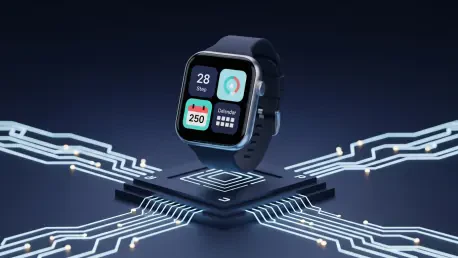
The transition from the legacy Tiles architecture to the new Wear Widgets system represents a major shift in the user interface philosophy of the platform. Previously, Tiles were limited to full-screen cards that required the user to swipe through multiple pages to find specific pieces of information, creating a linear and sometimes tedious navigation experience. Wear Widgets solve this by introducing modular layouts, such as 2×1 and 2×2 cards, that allow multiple data points from different applications to coexist on a single screen.
From a technical perspective, this change is driven by the adoption of RemoteCompose and Jetpack Glance, which align the watch development process with standard Android app creation. This alignment allows developers to adapt the logic from their phone-based widgets to the wrist with significantly less effort than the older ProtoLayout system required. Consequently, users can expect a much richer variety of glanceable information, as more developers find it feasible to bring their app data to the Wear OS interface.
While the legacy full-screen Tiles remain supported for the time being to maintain backward compatibility, the industry direction is clearly moving toward these flexible widgets. This modularity enables a more personalized home screen experience where a user can see their step count, the local temperature, and a package delivery countdown all in one view. It transforms the watch from a series of individual apps into a cohesive dashboard that mirrors the efficiency of a high-end smartphone interface.
How Do Live Updates Change the Way Information Is Displayed?
The introduction of Live Updates adds a dynamic layer to the watch face that was previously reserved for static complications or standard notifications. This feature utilizes persistent status chips that appear in the notification tray and on supported watch faces, providing real-time data that updates automatically. For example, a user tracking a ride-share vehicle or a food delivery no longer needs to keep the app open; instead, a live countdown remains visible and active as they go about their day.
This real-time data layer is built with strict power management constraints to ensure that the constant updates do not drain the battery excessively. By using specific APIs that minimize wake cycles, the system can surface critical text and chronometer data with minimal impact on performance. This approach represents a more sophisticated way of handling urgent information, moving away from intrusive pop-up notifications toward a persistent and helpful presence on the wrist.
Moreover, these improvements extend to media management, allowing for more granular control over which applications are permitted to auto-launch their controls. Users can now prevent certain apps from hijacking the media screen, ensuring that only the relevant player is visible when needed. A consolidated output switcher further simplifies the process of moving audio between Bluetooth headphones and smart speakers, making the watch a much more effective remote for the broader Google Home ecosystem.
Will the Original Pixel Watch Receive This Software Update?
Despite the many advancements included in Wear OS 7, the original Pixel Watch released earlier in the decade has been excluded from this update cycle. Google officially ended software support for the first-generation model in 2025, meaning it will not transition to the new Widget architecture or receive the battery optimizations found in this release. The hardware limitations of the older processor and the lack of certain architectural requirements made it difficult to maintain the performance standards necessary for the new software.
For owners of the debut model, this signifies a plateau in functionality where the device will continue to operate on its current version but will miss out on the evolving ecosystem of Wear Widgets and Live Updates. While the watch remains a capable fitness tracker, the divergence in software marks a clear boundary between the first generation and the more modern Pixel Watch iterations. Those who wish to experience the new interface and the accompanying efficiency gains will find that a hardware upgrade is the only available path.
Summary or Recap
The arrival of Wear OS 7 brings a comprehensive set of upgrades to the Pixel Watch 2, 3, and 4, fundamentally altering the user interface through the introduction of Wear Widgets. This move away from full-screen Tiles allows for a more dense and useful display of information, while the Live Updates feature ensures that time-sensitive data remains visible without manual intervention. The update also provides a tangible 10 percent boost in battery life across all supported models, demonstrating Google’s commitment to maximizing the potential of its existing hardware.
Current owners find that their devices are now more integrated with the broader Android development ecosystem, thanks to the shift to Jetpack Glance and RemoteCompose. While some advanced AI features remain exclusive to future hardware equipped with specialized neural processing units, the core experience for existing users is significantly enhanced. The exclusion of the original Pixel Watch serves as a reminder of the rapid pace of wearable technology, highlighting the importance of the more modern silicon found in the subsequent generations.
Conclusion or Final Thoughts
The rollout of Wear OS 7 functioned as a bridge between the foundational era of smartwatches and the sophisticated, data-rich environment that users now expect. It proved that software ingenuity could indeed breathe new life into existing sensors and processors, offering a more refined experience without the immediate necessity of a hardware purchase. The transition was a successful demonstration of how architectural alignment across different Android form factors could lead to a more vibrant and developer-friendly platform.
As the ecosystem moved forward, the focus shifted toward how these new frameworks would eventually host more complex on-device intelligence. The groundwork laid by the new Watch Face Format and the modular widget system prepared the interface for a future where the watch acts as a proactive assistant rather than just a passive display. Owners of the Pixel Watch 2, 3, and 4 were left with a device that felt faster and lasted longer, securing their place in the modern wearable landscape for the foreseeable future.