


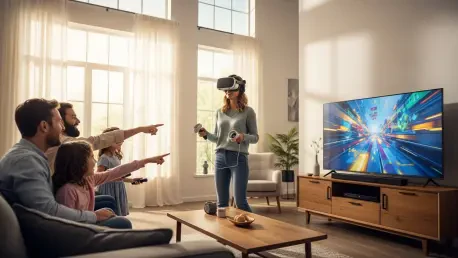

The rapid evolution of spatial computing has transformed what was once a solitary escape into a powerful catalyst for social engagement during lively family gatherings. While early iterations of virtual reality often isolated users in a digital void, the hardware and software ecosystems available from 2026 to 2028 focus heavily on shared presence and spectator value. This shift has turned the headset into a modern campfire, where the person “inside” the experience is merely one part of a larger, collective entertainment event. Modern systems now prioritize ease of use, allowing even the most tech-averse relatives to participate without the intimidation factor usually associated with high-end gaming. By leveraging low-latency streaming and intuitive interfaces, a single device can bridge the gap between generations, providing a centerpiece for laughter and competition. Successfully hosting such a session requires a blend of technical preparation and curated content selection to ensure that the excitement remains consistent for both the active player and those watching from the couch.
1. Mirror the Headset’s View to Your Television Screen
The most critical step in transforming a personal VR experience into a group activity involves bridging the gap between the virtual world and the physical room. Most modern headsets support direct casting to smart televisions or dedicated streaming dongles via protocols like Miracast or specialized proprietary signals. By broadcasting the player’s perspective onto a large screen, the isolation of the headset is immediately broken, allowing every person in the room to track the action in real time. This visual transparency is essential for maintaining a high level of energy during the party, as it provides the necessary context for the movements and reactions of the person wearing the device.
Beyond the technical necessity, mirroring creates a theatrical atmosphere where spectators become active participants in the narrative. They can offer advice, shout warnings, or simply enjoy the comedic mishaps that occur when someone navigates a digital environment for the first time. To ensure a smooth experience, it is advisable to use a robust 5GHz or 6GHz Wi-Fi connection to minimize the latency between the headset and the display. High-quality audio should also be routed through the television’s sound system, ensuring that the immersive soundscapes are shared with the entire audience, effectively turning the living room into a localized virtual reality theater.
2. Start with Easy-to-Play Games That Are Fun to Watch
When introducing family members to virtual reality, the initial software selection can determine the success of the entire evening. It is best to choose “pass-and-play” titles that feature short rounds and highly intuitive mechanics, such as rhythmic slicing or physics-based puzzles. Games like Beat Saber remain a staple in 2026 because they provide an immediate visual and auditory payoff that is as exciting for the crowd as it is for the player. The sight of someone dancing and swinging glowing sabers to a heavy beat provides a natural entertainment value that requires no explanation, making it an ideal icebreaker for guests of all ages.
Physics-based comedies like Job Simulator or Vacation Simulator offer a different but equally engaging appeal by leaning into the absurdity of virtual interactions. These titles allow newcomers to experiment with a responsive world where they can throw items, serve digital food, or cause harmless chaos, often leading to hilarious results for those watching the television screen. Similarly, straightforward titles like Fruit Ninja VR allow players to use natural hand gestures to engage with the environment. By focusing on games with a low barrier to entry, the host ensures that the learning curve never stalls the party’s momentum, keeping the focus on fun rather than complex controls.
3. Pick Games That Allow the Whole Group to Play Using Their Phones or Printed Guides
Asymmetric gameplay represents the pinnacle of social virtual reality, as it forces the person in the headset to communicate constantly with people in the physical world. A premier example of this is the bomb-defusal simulator Keep Talking and Nobody Explodes, where the headset wearer sees a complex explosive device but has no idea how to disarm it. The rest of the family must look through a printed or digital manual to provide instructions, creating a high-stakes, collaborative environment. This dynamic shifts the focus from the technology to the interaction between family members, fostering a sense of teamwork and collective triumph.
Other titles expand this concept by integrating mobile devices directly into the game loop, such as Acron: Attack of the Squirrels. In this scenario, one player takes on the role of a massive, ancient tree protecting its golden acorns within the headset, while everyone else uses their smartphones to control nimble squirrels attempting to steal them. This cross-platform approach allows up to eight people to play simultaneously without needing additional expensive hardware. By distributing roles across different devices, the host can ensure that no one feels left out of the action, effectively leveraging the VR headset as a hub for a much larger, multi-device ecosystem.
4. Use Multiple Devices or Cross-Platform Features if They Are Available
For families fortunate enough to have access to more than one headset, the possibilities for social interaction expand into the realm of fully shared virtual spaces. Cooperative experiences like Walkabout Mini Golf provide a relaxed, low-pressure environment where family members can walk through fantastical courses and chat as if they were on a real outing. The physics are incredibly realistic, yet the gameplay is simple enough for children and grandparents to master within minutes. This type of shared presence is uniquely effective at bringing distant relatives together in a way that traditional video calls simply cannot replicate.
If the group seeks more intense coordination, cooperative simulations like Just Another Cooking Game or tactical titles like Demeo offer deep, rewarding gameplay. Demeo, in particular, appeals to board game enthusiasts by placing players around a digital tabletop to battle through dungeons in a turn-based format. For older audiences who enjoy action, Arizona Sunshine 2 allows for a gritty, cooperative survival experience against waves of the undead. These multi-user setups rely on the seamless cross-platform features that have become standard in 2026, allowing different brands of hardware to connect effortlessly over a local network for a unified social experience.
5. Keep the Equipment Clean and Limit the Length of Each Turn
Maintaining the physical condition of the hardware is a vital, yet often overlooked, aspect of hosting a successful virtual reality session. Because headsets come into direct contact with the face, they can quickly become uncomfortable or unhygienic after multiple users. Utilizing replaceable silicone covers or disposable hygiene masks is a professional way to keep the experience fresh for every guest. It is also good practice to keep a pack of alcohol-free, skin-safe wipes nearby to clean the facial interface and the controllers between swaps. Taking these small steps demonstrates respect for the guests and ensures that the focus remains on the games.
In addition to cleanliness, managing the clock is essential for keeping the party energy high and preventing “spectator fatigue.” Limiting individual sessions to approximately five minutes or a single round of a game ensures a rapid rotation that keeps everyone engaged and prevents the person in the headset from becoming overly tired. A quick-turnover policy also helps mitigate the risk of over-immersion, where a player might lose track of their surroundings. By keeping the pace brisk, the host can ensure that everyone gets multiple opportunities to play throughout the night, making the device a shared resource rather than a prize for a single dominant user.
6. Ensure the Playing Area Is Safe and Watch for Signs of Motion Sickness
Creating a secure physical environment is the foundation of a worry-free VR party, as players can easily lose their sense of direction once the headset is on. The host should clear a dedicated “buffer zone” of at least six feet by six feet, removing rugs, low tables, and any fragile decorations that could be struck during an enthusiastic session. It is also important to keep pets and small children at a safe distance from the active player to prevent accidental collisions. Establishing a “spotter” role, where a seated guest keeps a watchful eye on the player’s proximity to walls, adds an extra layer of safety and involvement for those not currently in the game.
Equally important is the monitoring of guest comfort, particularly regarding motion sickness, which can affect newcomers more intensely. To minimize this risk, it is best to start with “stationary” experiences where the virtual world does not move independently of the player’s physical head movements. If a guest mentions feeling even slightly dizzy or warm, the protocol should be to have them remove the headset immediately for a break. Pushing through nausea only leads to a negative association with the technology. By prioritizing physical and biological safety, the host ensures that the memory of the event is defined by the fun of the games rather than the discomfort of the experience.
Future-Proofing Your Virtual Social Strategy
The most successful hosts prioritized the comfort and inclusion of their guests by maintaining a rigid rotation schedule and a clean environment. They observed that the transition from 2026 toward more advanced spatial interfaces required a proactive approach to technical troubleshooting, particularly with local network stability for casting. By selecting titles that bridged the gap between virtual immersion and physical room interaction, these organizers successfully avoided the isolation trap that often plagued early adopters. The implementation of asymmetric games proved to be the most effective way to maintain high engagement levels, as it gave every person in the room a meaningful role to play in the digital outcome.
Moving forward, the integration of VR into family gatherings should be viewed as a living social experiment that requires constant refinement of the physical space and software library. Future sessions benefited from the addition of haptic feedback accessories and improved bystander interfaces that made the television view even more interactive. Those who took the time to calibrate their play areas and establish clear safety boundaries found that their guests were much more willing to experiment with complex titles. As the ecosystem continues to evolve between now and 2028, staying updated on cross-platform compatibility will remain the best way to ensure that the “ultimate party trick” never loses its magic.







