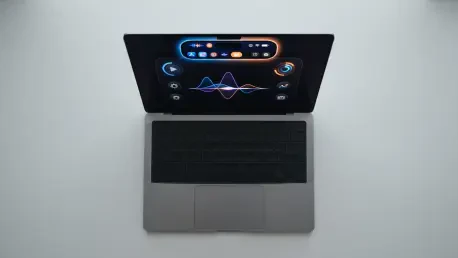

For more than a decade, the invisible wall between Apple’s mobile touch interfaces and its desktop precision remained an immovable boundary in the world of high-end computing. The landscape of professional computing shifted significantly during Apple’s recent “Pro and Tell” event in Los Angeles, where the tech giant introduced the most substantial architectural overhaul to the MacBook Pro in years. By unveiling the new 14-inch and 16-inch models equipped with OLED touchscreen technology, the company finally addressed a decade of user speculation and intense industry pressure. This release does more than just add a new input method; it reimagines the tactile relationship between the user and the machine, signaling a departure from the long-held philosophy that touch and desktop operating systems should remain separate.
This architectural shift is a strategic response to the evolving needs of creative professionals who demand more direct interaction with their digital canvases. While the standard M6 models provide high-performance baselines for general users, these specialized M5 Pro and M5 Max touchscreen units are positioned at the absolute summit of the product lineup. By integrating advanced display technology with a refined physical chassis, the developer has created a flagship that bridges the gap between the iPad’s portability and the Mac’s raw power. The following analysis explores how this hardware leap, combined with refined aesthetics and a new pricing strategy, redefines what a flagship laptop can be in the current market.
The move toward a touch-enabled interface suggests that the internal resistance to merging user experiences has been overcome by the pursuit of technological perfection. Experts note that this transition is not merely a feature addition but a fundamental change in the macOS ecosystem. As professionals begin to integrate touch workflows into their daily tasks, the distinction between mobile and desktop computing continues to dissolve, creating a more cohesive environment for developers and designers alike.
The Journey From Tradition to Touch Innovation
For years, the industry maintained a strict divide between the iPad’s touch-first interface and the Mac’s precision-based cursor environment. This historical context is vital for understanding the weight of the current announcement. While Windows competitors have iterated on touchscreen laptops for over a decade, the decision to wait until the underlying technology met stringent standards for display quality and structural durability proves that precision was prioritized over speed to market. Past developments, such as the introduction of the Touch Bar, were seen as intermediate steps that failed to fully bridge the gap between the two interaction paradigms.
Today’s shift to the “PROLED XDR” display marks the conclusion of that experimental era, leveraging foundational concepts from the iPad Pro’s tandem OLED architecture to bring professional-grade touch capabilities to the macOS ecosystem. The timing of this release is particularly significant as it follows a period of stagnation in laptop display innovation. By incorporating the learnings from their mobile devices, engineers have managed to solve the glare and fingerprint issues that plagued early touch-enabled laptops. This historical pivot ensures that the new MacBook Pro remains relevant in a market where users increasingly expect haptic and tactile feedback.
Furthermore, the evolution of the Mac reflects a broader industry trend where the lines between hardware categories are becoming blurred. Market analysts observed that the refusal to adopt touch was becoming a competitive disadvantage in the education and creative sectors. By finally merging these worlds, the developer has silenced critics who argued that the Mac was falling behind in versatility. This change represents a long-term commitment to a unified user experience that respects the heritage of the keyboard and trackpad while embracing the intuitiveness of direct screen manipulation.
Integrating Interactive Hardware and Software
The Leap to PROLED XDR and Tandem OLED Technology
The transition from Mini-LED to the new PROLED XDR panels represents a massive leap in visual performance for the professional market. By utilizing tandem OLED technology, these screens achieve a staggering 10,000,000:1 contrast ratio, delivering true blacks and per-pixel lighting control that was previously impossible on a laptop. Reaching peak brightness levels of 2,000 nits for both HDR and SDR content, the display ensures that creative professionals can work in any lighting condition without compromising color accuracy. This shift addresses the inherent challenges of “blooming” seen in older display tech, providing a more precise canvas for high-end video and photo editing.
Beyond the raw brightness, the inclusion of updated ProMotion technology allows the refresh rate to scale dynamically from 10Hz to 120Hz. This variability is crucial for maintaining battery efficiency during static tasks while providing fluid motion for intensive animation work. The tandem OLED structure also provides a layer of redundancy and longevity that single-layer OLED panels lack, mitigating the risk of burn-in over years of professional use. For photographers and colorists, this means a reliable and consistent visual experience that matches the output of high-end reference monitors.
Reimagining User Interaction Through macOS 27
To support the new hardware, the introduction of macOS 27 provides an operating system specifically tuned to handle touch input without losing its desktop roots. The integration of touch sensors directly into the display panel minimizes latency, making gestures feel instantaneous and natural. A key feature of this new interface is the Dynamic Island, which replaces the traditional camera notch. This interactive pill-shaped cutout serves as a central hub for Siri AI, Live Activities, and Spotlight searches. By translating touch gestures into standard click commands, the system remains backwards compatible with existing software, mitigating the risks of a fragmented app ecosystem.
The operating system also introduces refined hit targets and gesture-based multitasking that complement the existing keyboard shortcuts. This hybrid approach allows users to switch between high-precision mouse work and quick touch-based navigation without friction. The intelligence behind macOS 27 can distinguish between intentional prods and accidental palm rests, a common issue in previous generations of touch laptops. Such software-level refinement ensures that the transition to touch feels like an enhancement rather than a distraction from the core computing experience.
Engineering Stability in a Thinner Chassis
One of the primary criticisms of touchscreen laptops is the tendency for a display to shake when tapped, often referred to as “screen wobble.” Engineers have countered this by designing a new high-resistance hinge that remains steady under pressure, providing a tactile experience as solid as a traditional screen. Despite this mechanical reinforcement, the laptops are thinner and lighter than their predecessors, with the 14-inch model weighing just 3 pounds. This was achieved through a complete rework of the thermal management system, which now vents air through the hinge assembly.
The return of the illuminated Apple logo on the lid serves as a nod to classic design, blending modern innovation with nostalgic aesthetics that resonate with long-time users. Additionally, the six-speaker audio system has been improved with a new woofer design that effectively doubles the depth of the bass. These structural enhancements show that adding touch functionality did not require a sacrifice in portability or audio-visual quality. The result is a machine that feels significantly more modern while retaining the rugged build quality that the Pro line is known for in the professional sphere.
Future Horizons for the Mac Ecosystem
The introduction of the touchscreen MacBook Pro suggests a future where the boundaries between mobile and desktop computing continue to blur. As the developer integrates more iPad-like features into its professional laptops, a shift in how software developers approach application design is likely, favoring “universal” interfaces that thrive on both touch and trackpad input. This movement will probably lead to a new generation of creative software that utilizes the screen as a primary control surface for sliders, timelines, and drawing tools, potentially making external tablets redundant for many professionals.
Beyond the hardware, the shift toward higher-cost components like tandem OLED and massive 16TB storage configurations indicates that the industry is moving toward even more specialized, high-performance niches. Experts predict that this move will force competitors to innovate further in display technology and haptic feedback to keep pace with these premium standards. From 2026 to 2030, the market may see a total convergence of the tablet and laptop form factors, driven by the success of this current architectural pivot.
Strategic Insights for Professionals and Consumers
For users considering an upgrade, the new MacBook Pro offers a compelling but expensive proposition. The $2,899 starting price for the 14-inch model and $3,399 for the 16-inch model reflect a significant upward trend in the pricing structure for high-end laptops. Professionals should weigh the benefits of the PROLED XDR screen and touch functionality against their specific workflow needs, especially since the internal M5 Pro and M5 Max chips remain the primary powerhouses. For those who prioritize raw speed over display innovation, the entry-level M6 models may be more practical, while the new touchscreen flagships are clearly positioned as the ultimate tool for creatives.
Organizations looking to equip their teams should view this as a long-term investment in versatility. The inclusion of Thunderbolt 5 and massive memory options ensures that these machines will remain viable well into the late 2020s. However, the increased entry price means that budget-conscious departments might need to adopt a tiered approach, reserving these touchscreen models for lead designers and editors while utilizing standard models for general administrative tasks. Navigating this new pricing landscape requires a clear understanding of where touch interaction provides a tangible return on productivity.
A Transformative Milestone in Laptop Design
The new MacBook Pro with an OLED touchscreen represents a major technical achievement in display technology and mechanical engineering. It successfully merged the power of a professional workstation with the versatility of touch interaction in a way that felt both futuristic and familiar. By restoring beloved design elements like the glowing logo and introducing cutting-edge PROLED XDR technology, the developer created a machine that addressed the evolving demands of the creative industry. While the performance remained tied to the M5 architecture, the addition of the PROLED XDR screen and macOS 27 touch optimizations made this a transformative upgrade for high-end users.
Professional users found that the high entry price reflected a commitment to premium materials and cutting-edge display tech, solidifying the role of this machine as a specialized tool for intensive use. As these units reached consumers, the MacBook Pro reaffirmed its position as the gold standard for specialized professional use in an increasingly tactile digital world. The success of this launch suggested that the market was ready for a more interactive desktop experience, paving the way for future innovations in the portable computing sector. Ultimately, the integration of touch into the Mac lineup served as the final piece of a puzzle that had been in development for years, completing the unification of the hardware ecosystem.